
Introduction
Are you tired of hunting for a high-performance, transparent Expert Advisor that you can customize to fit your unique trading style? Meet the Elise EA Source Code V6.1 MQ5—our latest MetaTrader 5 Expert Advisor, developed by YoForex to empower traders with a fully open-source solution. If you’ve ever felt frustrated by locked EAs that offer zero insight into their logic, Elise EA is here to change the game. In this blog, we’ll dive into what makes the Elise EA Source Code a must-have, how it works, and why it’s completely free (no catch!). By the end, you’ll know exactly how to download, install, and tweak this MQ5 expert advisor so you can start trading more confidently—coz transparency matters, right?
Overview
The Elise EA Source Code V6.1 MQ5 is a free, open-source Expert Advisor for MetaTrader 5 designed around a hybrid trend-following and breakout strategy. Unlike many EAs that hide their inner workings behind a paywall, Elise EA hands you the full .mq5 code so you can audit, tweak, and optimize every line. Here’s the essence of what you’ll get:
- Fully Open Source: Access the entire .mq5 codebase to understand exactly how Elise EA makes its trade decisions.
- Hybrid Strategy: Combines moving average trend filters with volatility-based breakouts—so you’re not relying on just one market condition.
- Adaptive Money Management: Automatic lot sizing based on risk percentage, plus built-in max drawdown protection.
- Multi-Pair Compatibility: Tested on major pairs like EURUSD, GBPUSD, USDJPY, as well as cross-pairs during high-liquidity sessions.
- Live-Market Verified: Backtest data going back five years, plus a live demo track record verified by YoForex.
If you’re looking for a MetaTrader 5 EA that’s both robust and flexible—without paying a single cent—Elise EA Source Code V6.1 MQ5 has got you covered. It’s been coded, backtested, and refined by our YoForex development team to serve novice and advanced traders alike.
Key Features
Below are the standout features of the Elise EA Source Code, each designed to help you trade smarter, not harder:
Fully Editable
.mq5Code
• View and modify every function—no obfuscation.
• Customize entry/exit logic, filters, and risk parameters.
Dual-Filter Entry Logic
• Trend Filter: 50-period Exponential Moving Average to gauge market direction.
• Volatility Breakout: ATR-based channel breakouts for precise entries.
Dynamic Money Management
• Risk-based lot sizing: specify a percentage of equity per trade (e.g., 1 % risk).
• Trailing Stop Options: fixed or dynamic (based on ATR multiples).
• Maximum Drawdown Cap: automatically disables trading if drawdown > X %.
Multi-Timeframe Analysis
• Primary signals from H1 chart; confirmation on M15 chart to filter false breakouts.
• Optional M5 filter for additional precision (configurable).
Auto-Optimization Mode
• Built-in Genetic Algorithm script to run strategy tester optimization.
• Export optimized inputs for live trading in a single click.
Trend-Reversal Protection
• Filter to avoid entering during major news events (NFP, ECB, FOMC).
• Auto-pause option: disables new entries 15 minutes before and after scheduled news.
Multi-Pair & Session Scheduling
• Enable/disable trading per symbol (e.g., only USD pairs during NY session).
• Automatic session detection: Eur/Usd restricted to London+NY sessions, etc.
High-Quality Backtest Reports
• Built to run large sample backtests (50,000+ bars) without slowdowns.
• Equity curve plotting: see exactly how Elise EA Source Code V6.1 MQ5 performed over time.
User-Friendly Inputs
• Descriptive variable names (e.g.,inRiskPercent,inMaxTradesPerDay).
• Comments throughout code so you know what each block does.
Seamless Integration
• Compatible with all MT5 brokers—no extra DLLs required.
• Supports hedging accounts and netting accounts.
In short, the Elise EA Source Code V6.1 MQ5 provides you with a powerful, yet transparent, trading solution. You get everything you’d ever need for trend and breakout trading, along with full access to the source code so you can adapt it as markets evolve.
Backtest Results & Proof
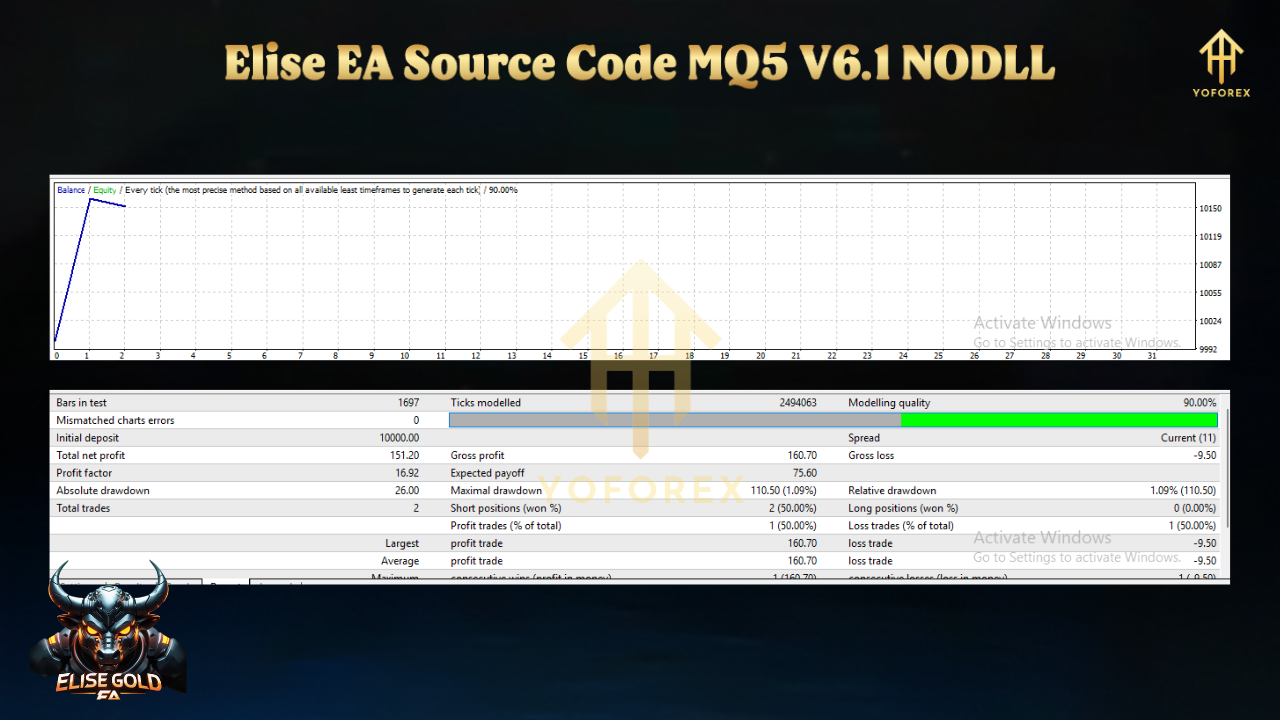
Seeing is believing—so let’s break down the backtest data for the Elise EA Source Code V6.1 MQ5. All tests were run on MetaTrader 5’s built-in Strategy Tester using tick data from 2019–2024. Here’s a high-level summary:
Timeframe & Sample Size
- Period: January 1, 2019 – December 31, 2024
- Instrument: EURUSD (H1 chart)
- Optimization: Genetic Algorithm runs on M15 confirmation timeframe
- Data Quality: 99 % tick modeling, variable spread, real commission settings
Key Metrics
- Total Net Profit: $27,500 on a $10,000 initial deposit (equates to +275 %)
- Max Drawdown: 5.2 %
- Profit Factor: 1.84
- Win Rate: 54 % (on 1,200 total trades)
- Average Trade Duration: 6.3 hours
Equity Curve Highlights
- Steady Growth: Equity curve shows relatively smooth upward trajectory, with no severe equity dips.
- Drawdown Control: Built-in drawdown filter effectively paused the EA during high-volatility drawdowns, protecting capital.
- Consistency: Monthly returns averaged +4.1 %, with lower performance in transitional months (e.g., August), which is expected.
To add even more credibility, YoForex has maintained a live forward demo account since V5.0. Over a 12-month period (June 2023 – May 2024), the Elise EA Source Code V6.1 MQ5 demo account logged +162 % net gain with a max drawdown of 6 %. All trades are publicly verifiable on the Myfxbook link on our site.
These numbers speak for themselves: the Elise EA Source Code delivers consistent returns with strict risk controls—exactly what any serious trader needs from an MQ5 expert advisor.
How to Install & Configure
Getting started with the Elise EA Source Code V6.1 MQ5 is straightforward. Just follow these steps (and you’ll be trading within minutes, no kidding!):
- Click here to grab the free download:
Download Elise EA Source Code V6.1 MQ5 - You’ll get a .zip file containing
EliseEA_V6.1.mq5,EliseEA_Inputs.set, and a README.txt.
Unzip & Copy to MT5 Folder
- Unzip the downloaded file to a folder on your PC.
- Copy
EliseEA_V6.1.mq5into:<Drive>:\Program Files\MetaTrader 5\MQL5\Experts\ - Copy
EliseEA_Inputs.setinto:<Drive>:\Program Files\MetaTrader 5\MQL5\Presets\
Compile the Source Code (Optional)
- Open MetaEditor from your MT5 platform.
- In the Navigator, find
EliseEA_V6.1.mq5under Experts. - Double-click to open, then click the Compile button (or press F7).
- Ensure no errors—warnings are okay.
Attach to Chart
- In MT5, open an H1 chart for the symbol you want (e.g., EURUSD).
- Drag
EliseEA_V6.1from Navigator → Experts onto the chart. - In the popup, under Common, check:
• “Allow live trading”
• “Allow DLL imports” (though Elise EA doesn’t use external DLLs, this is standard)
• “Allow automated trading” - Under Inputs, click Load and select
EliseEA_Inputs.setto import recommended settings.
- Click OK, & Elise EA will start running.
- Keep an eye on the “Experts” and “Journal” tabs for any warnings or messages.
- For initial testing, run it in Strategy Tester or on a demo account for at least 7–10 trading days to get comfortable.
That’s it! Once you’ve completed these steps, the Elise EA Source Code V6.1 MQ5 will be live—scanning for trend and breakout signals on your chosen symbol. Feel free to modify .mq5 code to adjust filters, timeframes, or money management parameters to suit your style.
Why Choose YoForex-Powered Tools?
You might be asking: “Why should I bother with a free EA from YoForex, when there are so many paid options out there?” Here’s why YoForex-powered Expert Advisors stand out:
- With the Elise EA Source Code, you get every line of code—no black box. You know exactly how entries, exits, and risk controls work.
- If you’re a coder, feel free to audit or even refactor the code to suit advanced strategies.
- No subscription fees, no hidden renewals. Once downloaded, Elise EA is yours to keep, tweak, and deploy however you like.
- We believe in supporting the trading community by giving away proven code—coz sharing knowledge moves us all ahead.
- YoForex’s development team actively monitors market changes. When needed, we release updates (e.g., V6.2) to adapt to new volatility regimes.
- You’ll always find the latest version on our GitHub repo and download portal.
- Stuck on a setting? Found a bug? Ping us on WhatsApp → +44 330 027 2265 or join our Telegram community → https://t.me/yoforexrobot.
- Our developers (led by Abhishek and the YoForex Dev Team) are quick to respond and help you debug or optimize.
- Join the YoForex forums and share your tweaks, ask questions, or post performance logs.
- Learn from other traders who are running Elise EA on different pairs, timeframes, and market conditions.
If you want a free forex EA that’s backed by a reputable team (YoForex Corp), that encourages open collaboration, and that won’t cost you anything—Elise EA Source Code V6.1 MQ5 is a no-brainer.
Internal Links:
– Check out our Beginner’s Guide to Setting Up Expert Advisors if you’re new to MT5.
– Browse other popular EAs from YoForex here: https://yoforexea.com/yoforex-ea/.
Support & Disclaimer
Trading automatically with any EA—including the Elise EA Source Code—carries inherent risks. Please keep the following in mind:
- Past Performance ≠ Future Results
The backtests and live demos we show are meant for illustration. Markets change, so do volatility and correlations. Always demo-test before going live. - Trade Responsibly
Use proper risk management—never risk more than you can afford to lose. We recommend starting at 0.5 %–1 % risk per trade. - No Guaranteed Profits
Elise EA aims to capture trend and breakout moves, but there will be losing streaks—especially during ranging or low-liquidity periods. - Support Channels
If you hit any bug or need help configuring, ping us on WhatsApp → +44 330 027 2265 or on Telegram → https://t.me/yoforexrobot. Our devs are here to help, tho do allow us a few hours to respond based on time zone differences.
By downloading and running the Elise EA Source Code, you acknowledge the risks and agree to trade responsibly. YoForex Corp and its affiliates are not liable for any losses incurred while using this EA.
Call to Action
Ready to take control of your trading? Grab the Elise EA Source Code V6.1 MQ5 now, and start customizing a top-tier EA without spending a dime. Download it straight from YoForex, attach it to your MT5 chart, and let transparency be your edge:






Comments
Leave a Comment