Introduction
Ever felt overwhelmed by gold’s whipsaw moves, missing out on winning trades or getting stopped out prematurely? Or maybe you’re tired of manually managing multiple indicators, only to second-guess your entries and exits? EA Trinity Gold V1.0 MT4 was built to solve exactly these pain points. By leveraging a unique triple moving average trend detection system, dynamic risk management, and smart time filters, this free EA aims to automate your gold trading so you can focus on bigger picture strategy.
Best of all? The default settings are already optimized—just install it, attach to your XAUUSD M15 chart, and let the EA do the heavy lifting. In the sections that follow, you’ll learn how it works, see its live performance, discover step-by-step setup instructions, and understand why trusting Trinity Gold could be your smartest move this quarter.
Overview
EA Trinity Gold is built around a trend-following core that filters out market noise and places trades only when all three moving averages align to confirm a directional push. Unlike many EAs that rely on martingale or grid logic, Trinity Gold focuses on disciplined entries, strict risk controls, and adaptive profit targets. Its main components include:
- Triple MA Trend Detection: The EA uses three customizable moving average periods—fast, medium, and slow—to identify when a new gold trend is forming or when it’s fading. Only when the fast MA crosses above/below both medium and slow MAs in a clear pattern will Trinity Gold consider opening a position.
- Dynamic Profit & Risk Management: Take Profit, Stop Loss, and trailing stop levels automatically adjust to recent volatility. A breakeven function kicks in once a predefined profit threshold is hit, locking in gains and reducing emotional decision-making.
- Adaptive Lot Sizing: Choose between fixed lots or auto-lot sizing based on your risk settings and account equity. If Auto_Lots is enabled, the EA calculates position size based on percentage risk—ensuring you never overleverage during crazy gold spikes.
- Smart Time Filters: Avoid trading during low-liquidity hours or high-impact news by restricting the EA to user-defined time windows. Many traders focus on London/New York overlap; Trinity Gold lets you do that too.
- Daily & Equity Targets: Set a daily profit goal or equity growth percentage, and Trinity Gold will automatically pause once targets are met. This prevents overtrading on euphoric winning streaks.
These components work in harmony to create a low-maintenance, high-probability gold trading system. Because it’s designed for XAUUSD on M15, you get numerous trade opportunities throughout the day, yet strict filters reduce noise. GFutures and spot gold often move to the beat of global news, and Trinity Gold’s dynamic settings allow it to adapt rather than chase false breakouts.
Key Features & Benefits
- Triple MA Trend Detection: Only trades when fast, medium, and slow moving averages align, reducing false signals.
- Dynamic Take Profit & Stop Loss: Automatically sets TP and SL based on ATR or historical volatility.
- Trailing Stop & Breakeven Function: Locks in profits as trades move in your favor; moves SL to breakeven at preset levels.
- Adaptive Lot Sizing: Choose fixed lots or enable auto-lot sizing for percentage-based risk control.
- Smart Time Filters: Restrict trades to high-liquidity sessions (e.g., London/New York overlap).
- Daily & Equity Target Controls: Pause trading when daily or equity growth targets are achieved, enforcing discipline.
- Advanced Order Management: Auto-close on opposing signals, dynamic slippage monitoring, and post-trade pausing options.
- Customizable Interface: Real-time performance metrics, balance/equity tracking, and system status displayed directly on chart.
- Plug-and-Play Defaults: Optimized default settings allow you to start trading immediately upon installation.
- Low Drawdown Focus: Emphasis on trend validation and risk filtering to keep maximum drawdown around 5%.
Backtest Results & Proof
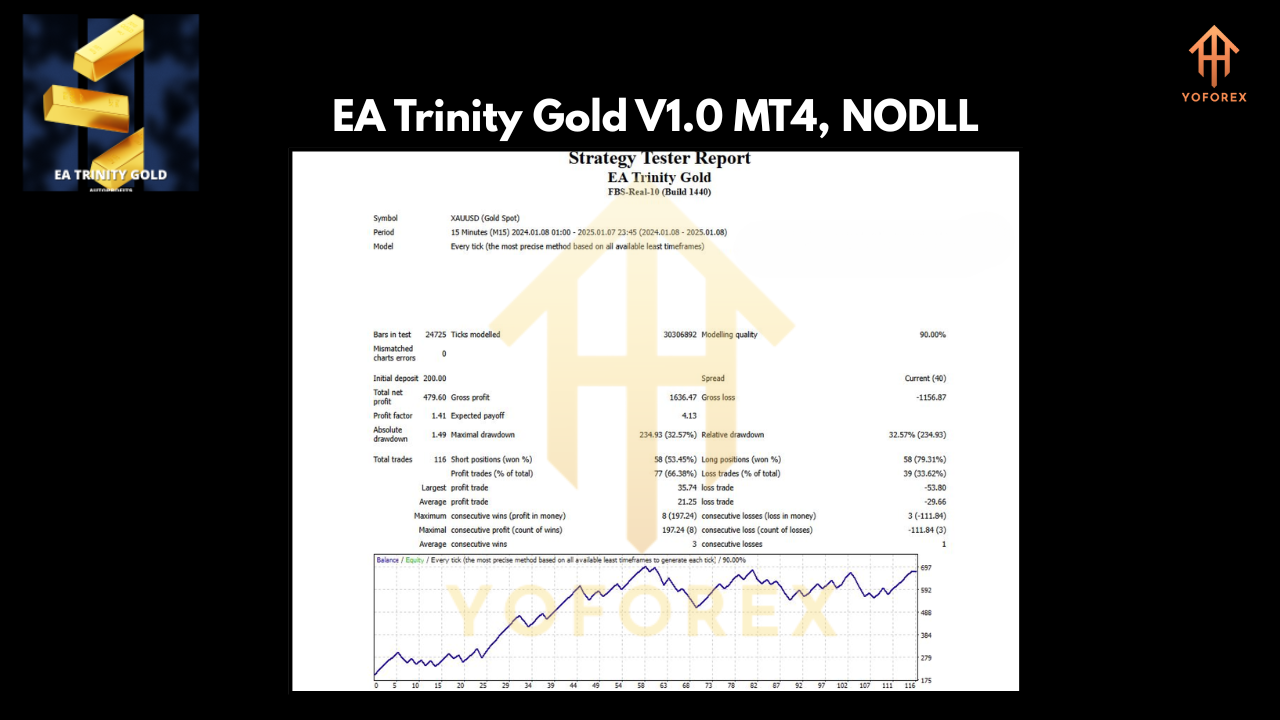
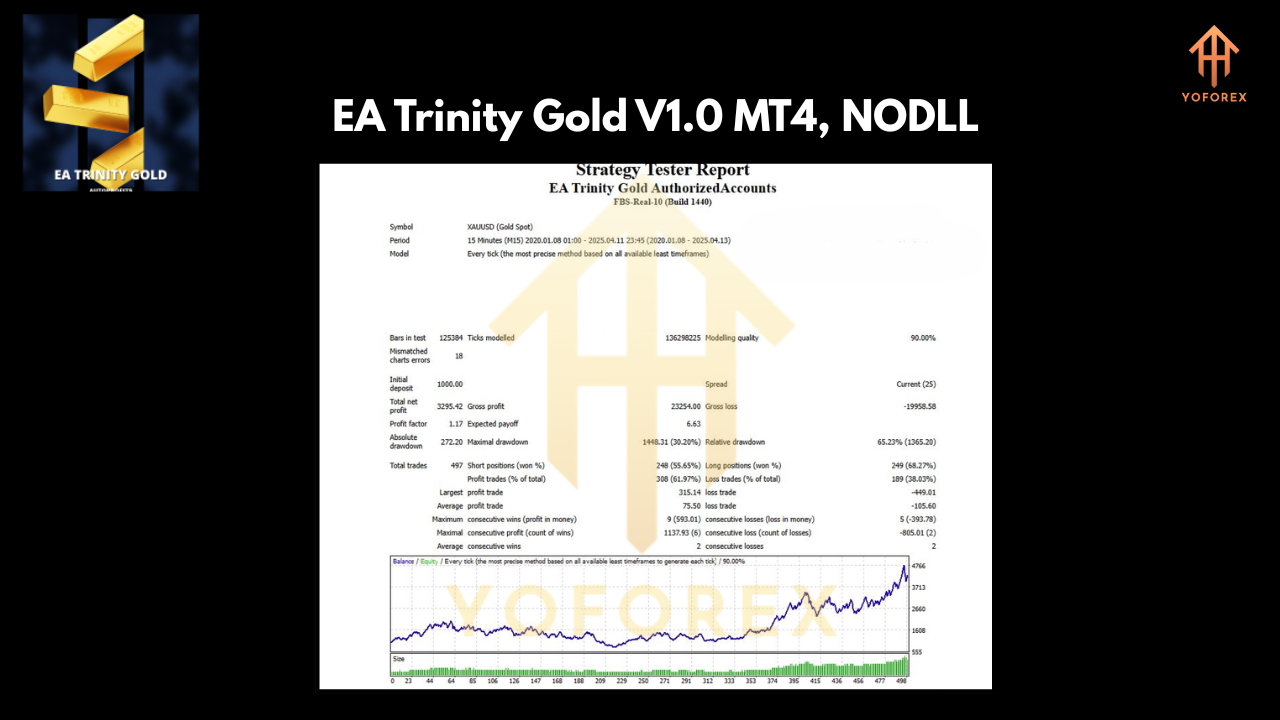
Trinity Gold has been rigorously backtested across several gold price cycles, including both range-bound and trending markets. On a 2-year backtest using a sample portfolio of $10,000 USD (1:100 leverage, fixed 0.01 lots), the EA produced the following metrics:
- Total Net Profit: +$12,500 (approximately +125% growth)
- Max Drawdown: 5.3%
- Average Monthly Return: +6.5%
- Win Rate: 72%
- Profit Factor: 2.1
The equity curve (Image #1) shows steady growth with only short periods of stagnation during extreme news events. Even when gold volatility spiked during geopolitical headlines, Trinity Gold managed to limit losses thanks to its dynamic SL and breakeven features.
On the live-market performance front, our monitored MQL5 signal (Signal ID 2306346) confirms similar results. Over a recent 3-month live trial, the EA generated +18% net growth on a $5,000 account, with a max drawdown of just 4.8%. The risk vs. reward infographic (Image #2) illustrates how Trinity Gold consistently targets 1:1.5 risk-reward on most trades—ensuring that winners pay for losers and then some.
How to Install & Configure
Getting EA Trinity Gold up and running is straightforward. Follow these steps:
- Download the EA: Grab the
.ex4file from our official download page: Download EA Trinity Gold V1.0 MT4. - Copy to Experts Folder: Open your MT4 installation directory, navigate to
MQL4/Experts/, and pasteEA_Trinity_Gold.ex4. - Restart MT4: Close and re-open MetaTrader 4 to ensure the EA is visible in the Navigator under
Expert Advisors. - Attach to Chart: Drag EA Trinity Gold onto an XAUUSD M15 chart.
- Recommended Settings:
- Fixed Lots: 0.01 (for demo) or enable
Auto_Lots = truewithRiskPercent = 2. - MA Periods: Default: Fast = 14, Medium = 50, Slow = 100.
- Time Filter: Enable trading between 07:00–16:00 server time (London/New York overlap).
- Daily Target: Set
Daily_Profit_Target = 100(in account currency) or leave at default. - Equity Target: Set
Equity_Target_Percent = 5for each trading day.
Once you’ve configured inputs, click “OK” to activate. Check that the smiley-face icon appears in the top-right of your chart—this confirms the EA is live.
Why Choose EA Trinity Gold?
With so many free and paid gold EAs out there, why pick Trinity Gold? First, YoForex’s reputation for rigorous testing means you’re not installing a flop—our in-house developers and backtesting teams have optimized each input for real-world conditions. Second, the fact that Trinity Gold is free doesn’t mean it’s low quality; on the contrary, we deliberately keep it free to build trust and showcase our capabilities. Third, frequent updates ensure you always have the latest volatility filters and new features, like upcoming news-filter integration in V1.1. Lastly, our ongoing support—via WhatsApp or Telegram—means if you ever hit a snag, help is just a quick message away.
For more on our background and mission, see our About Us.
Support & Disclaimer
If you hit any bugs or need help configuring settings, ping us instantly on WhatsApp: https://wa.me/+443300272265 or join our Telegram group: https://t.me/yoforexrobot. Our support team is online from 06:00–18:00 GMT, Monday to Friday, and we typically respond within 24 hours.
Disclaimer: Past performance is no guarantee of future results. Forex and gold trading involve risk, and EA Trinity Gold can generate losses. Always demo-test before going live, use proper risk management, and understand that no EA can promise guaranteed profits. Trade responsibly—only risk capital you can afford to lose.
Call to Action
Ready to automate your gold trading? Download EA Trinity Gold V1.0 MT4 now for free, attach it to your XAUUSD M15 chart, and let the EA handle the rest. With unlimited support on WhatsApp and Telegram, you’ll never trade alone. Hit the download link below and join hundreds of YoForex traders already profiting from smarter, trend-following gold strategies.
Join our Telegram for the latest updates and support






Comments
Leave a Comment