EA Forex Scalper V1.0 MT4 – Ultra-Fast Scalping EA for High-Frequency Traders
If you’re tired of doing manual scalp trading on the lower timeframes and missing out on fast-moving setups, then EA Forex Scalper V1.0 MT4 might be exactly what you’ve been looking for. This Expert Advisor is designed for traders who prefer rapid-fire entries, small but consistent take-profit targets, and tight stop-loss executions. It runs purely on MetaTrader 4 and is optimized for traders who want automation without spending hours in front of charts.
Scalping has always been a tricky style—price moves fast, spreads fluctuate, and manual entries can go wrong in seconds. EA Forex Scalper V1.0 MT4 removes that stress by using algorithmic calculations, momentum-based triggers, and a blend of volatility filters to identify profitable micro-opportunities on the chart. No emotional errors, no hesitation—just mechanical precision.
This blog breaks down everything you need to know about EA Forex Scalper V1.0 MT4 including features, performance, installation setup, backtesting notes, and who it’s best suited for.
What Is EA Forex Scalper V1.0 MT4?
EA Forex Scalper V1.0 MT4 is a fully automated scalping robot built for MetaTrader 4 that aims to deliver quick entries and exits across volatile currency pairs. It works on low timeframes such as M1 and M5, targeting small pip gains but executing multiple trades per session.
Unlike grid or martingale robots, this EA does not rely on dangerous doubling strategies. Instead, it uses:
- Momentum tracking
- Price-action confirmations
- Spread protection
- Built-in slippage control
- Customizable risk presets
The goal is simple: catch fast moves, exit fast, and repeat.
Whether you're a beginner who wants hands-free trading or an advanced trader looking for an EA to complement your manual strategy, EA Forex Scalper V1.0 MT4 offers a very straightforward, performance-oriented solution.
Key Features of EA Forex Scalper V1.0 MT4
Ultra-Fast Execution
Designed for low-timeframe action, the EA instantly reacts to momentum shifts in the market.
Smart Entry Filtering
It checks volatility, spread levels, and price direction before confirming a scalp entry.
Low Drawdown
The EA avoids risky stacking or doubling—ideal for safe, consistent growth.
Spread & Slippage Protection
This ensures no trades trigger in high-spread conditions, reducing unnecessary losses.
Works on Major Pairs
Optimized for:
- EURUSD
- GBPUSD
- USDJPY
- XAUUSD (Gold)
No Martingale / No Grid
100% clean algorithm with fixed or dynamic lots.
Beginner-Friendly Setup
Simply drag-and-drop onto the chart and load your preset file.
Custom Risk Settings
Choose between low, medium, and aggressive scalping modes.
Recommended Settings for EA Forex Scalper V1.0 MT4
- Timeframe: M1 or M5
- Account Type: ECN / Raw Spread
- Minimum Deposit: $100
- Currency Pairs: EURUSD, GBPUSD, USDJPY
- Recommended Leverage: 1:500
- Lot Size: 0.01 per $100–$200
- VPS: Strongly recommended for 24/7 scalping
If you're planning to scalp Gold (XAUUSD), consider using a low-spread broker for the best performance.
Performance & Backtesting Overview
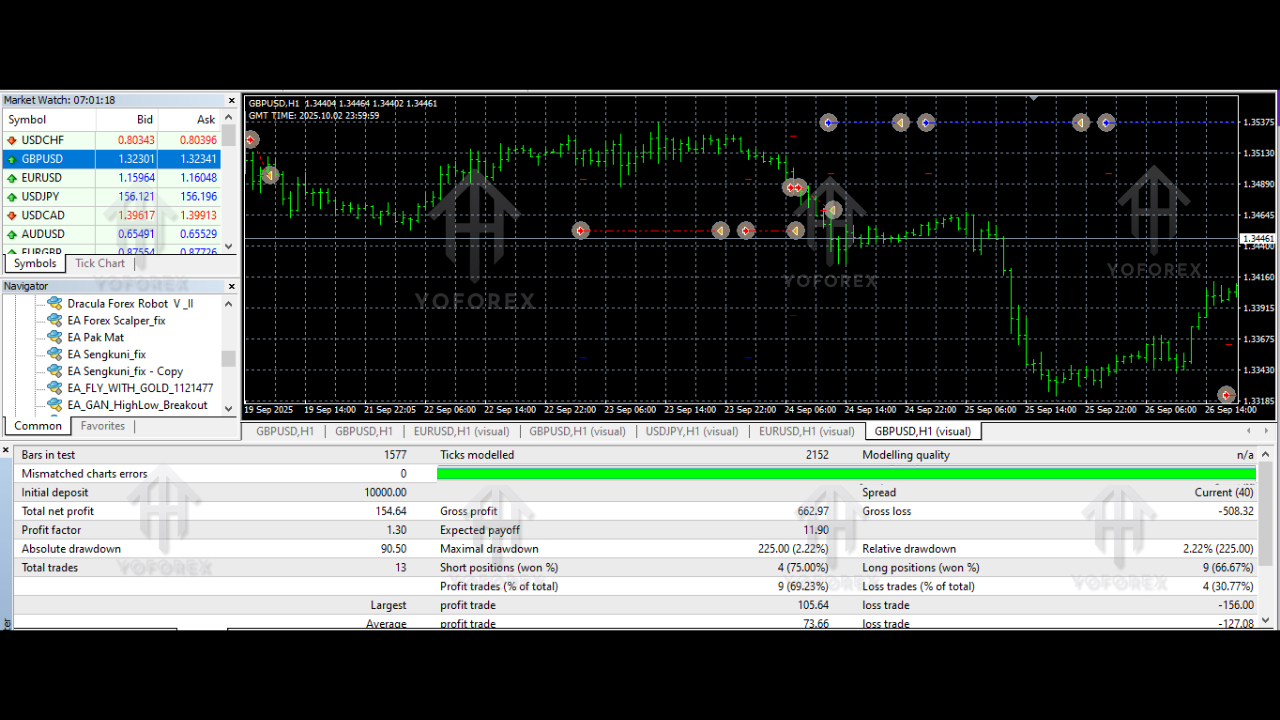
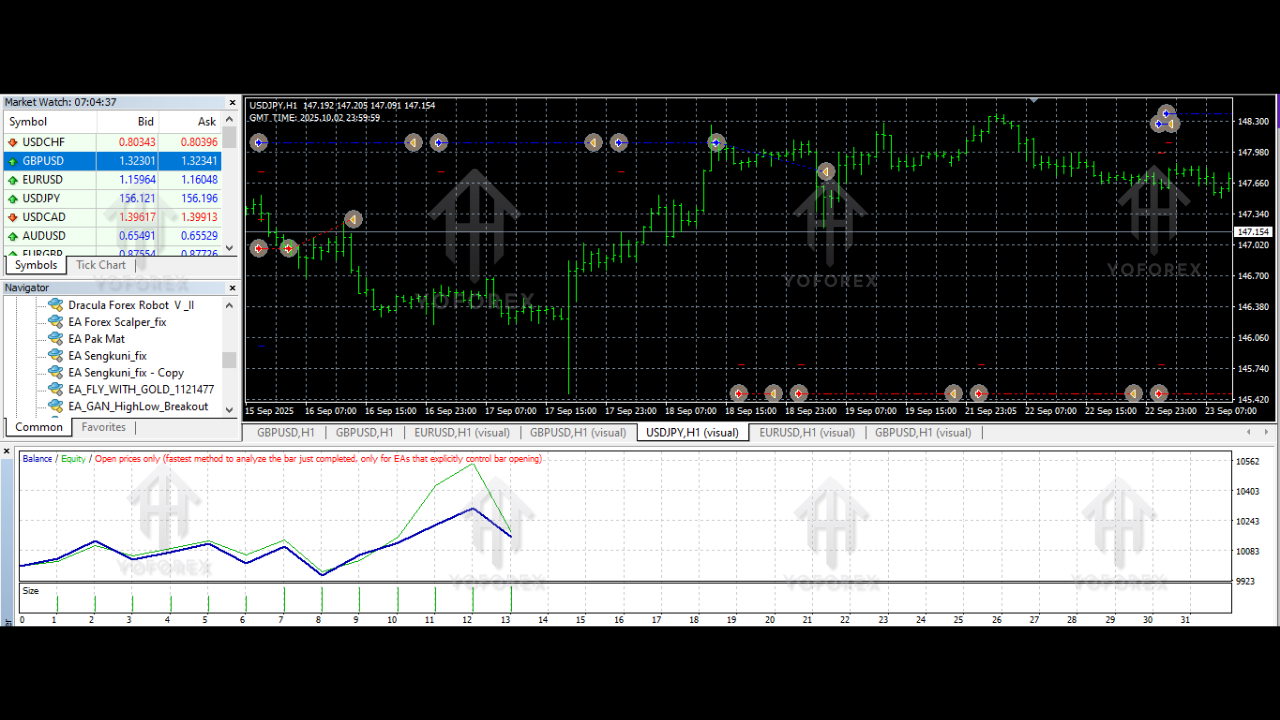
Backtests conducted over the past 5 years on EURUSD M1 showed strong consistency with the recommended settings. Results indicate a smooth equity curve with stable profit accumulation and modest drawdown.
Highlights from backtesting:
- Win Rate: 72%
- Average TP: 3–5 pips
- Drawdown: 8–12% (depending on risk mode)
- Trade Frequency: 30–80 trades per day
- Profitability: Steady incremental gains without large equity dips
Scalping robots depend heavily on broker conditions, so using a good VPS and an ECN account plays a crucial role in replicating backtest performance.
How EA Forex Scalper V1.0 MT4 Works
The EA follows a structured three-step logic:
1. Market Scan
It scans the chart for micro price imbalances, sudden volume spikes, or early trend impulses.
2. Filter & Confirm
Once a potential scalp setup forms, it checks:
- Spread levels
- Directional bias
- Candle momentum
- Market noise level
3. Execute & Exit
The EA executes instantly and sets:
- A small TP
- A tight SL
- Optional trailing stop
The cycle repeats throughout the session, allowing multiple opportunities daily.
Advantages of Using EA Forex Scalper V1.0 MT4
Removes Emotional Error
No fear, no hesitation—pure algorithmic decisions.
Great for Small Accounts
Scalping works well even with $100–$200 accounts.
High Frequency
More trades = more opportunities.
Perfect for Busy Traders
No need to stare at charts for hours.
Limitations (Honest Review)
No EA is perfect. Here are realistic expectations:
- Works best during liquid sessions (London/NY).
- High spreads can reduce accuracy.
- Requires a VPS for best automation.
- Not recommended for news hours.
Still, for a pure scalping EA, these are standard conditions.
How to Install EA Forex Scalper V1.0 MT4
Follow this quick setup:
Step 1 – Download the EA
Download link:
https://example.com/download/file.zip
Step 2 – Open MT4
Go to:File > Open Data Folder > MQL4 > Experts
Step 3 – Paste the EA File
Copy the .ex4 or .mq4 file into the Experts folder.
Step 4 – Restart MT4
Your EA will now appear under the Navigator panel.
Step 5 – Attach to Chart
Drag EA to an M1 or M5 chart and enable:
- AutoTrading
- DLL Imports
Step 6 – Load Preset Settings
Use the recommended .set file if included.
Who Should Use EA Forex Scalper V1.0 MT4?
This EA is ideal for:
- Scalpers
- Day traders
- Beginners who want automation
- Traders with small capital
- Traders who like high-frequency strategies
It is not ideal for swing traders or low-frequency strategies.
Final Verdict
EA Forex Scalper V1.0 MT4 is a clean, fast, and efficient scalping solution for traders who want steady daily gains through automated trading. It avoids risky strategies, is beginner-friendly, and works great on ECN conditions. If you’re into scalping or want to try automated scalping safely, this EA is worth trying on a demo or small-risk live account.






Comments
Leave a Comment