Introduction
If you’ve been hunting for a reliable MT4 expert advisor that balances solid returns with manageable risk, Dream Ark M5 EA V1.0 MT4 might just be your next go-to bot. In this detailed review, we’ll dive deep into what makes Dream Ark M5 EA tick, how it was developed, and why so many traders are flocking to it. We’ll also cover its strategy logic, backtest results, installation steps, and essential disclaimers—so you can trade with confidence (or at least understand exactly what you’re getting into).
Overview
Dream Ark M5 EA V1.0 MT4 is a free Forex EA designed for MetaTrader 4, engineered to operate on the M5 (5-minute) timeframe. Built around a hybrid of trend-following and mean-reversion principles, Dream Ark M5 EA seeks to identify micro-trend shifts while managing drawdown via dynamic lot sizing and built-in volatility filters. Unlike many paid EAs that rely on martingale or grid techniques, Dream Ark M5 EA focuses on steady compounding and adaptive risk control.
During development, the creators—backed by YoForex’s team of quants—ran multiple optimizations across EUR/USD, GBP/USD, and USD/JPY during both high-volatility and calm sessions. With a documented minimum deposit of just $100, Dream Ark M5 EA aims to make automated trading accessible to beginners, yet robust enough for experienced scalpers. Because it’s free, you can download, test it on a demo, and see real results without risking a dime—though, as always, past performance doesn’t guarantee future gains.
Key Features
Dream Ark M5 EA V1.0 MT4 offers a range of features designed to keep your trading both straightforward and adaptive:
- Optimized for M5 Timeframe: Trades on the 5-minute chart, capturing short-term moves with precision.
- Multi-Pair Compatibility: Pre-tested on EUR/USD, GBP/USD, USD/JPY; works on other majors with minimal tweaks.
- Adaptive Lot Sizing: Automatically adjusts lot size based on your account equity and configurable risk percentage (default 1% per trade).
- Built-In Volatility Filter: Uses ATR (Average True Range) to detect low-volatility ranges and avoid choppy market conditions.
- Trailing Stop and Break-Even: Configurable trailing stop (default 15 pips) and break-even functionality to lock in profits.
- No Martingale, No Grid: Relies on single‐position entries and exits—no compounding in losing trades.
- Time-Based Trading Sessions: Defaults to trading during London and New York overlaps (07:00–12:00 GMT) but can be customized.
- User-Friendly Inputs: Clear parameter names (RiskPercentage, MagicNumber, MaxSpread) for quick setup.
- Automatic News Filter: Pauses trading around major economic events (configurable buffer of ±30 minutes).
- Free Lifetime Updates: The EA is free to use and comes with ongoing improvements from the YoForex dev team.
Strategy and Logic
At its core, Dream Ark M5 EA V1.0 MT4 employs a two-step detection algorithm:
- Trend Confirmation: It looks for a short-term moving average crossover (e.g., 10-period SMA crossing above 20-period SMA) as the first filter. This helps identify the beginning of a nascent micro-trend.
- Volatility Check: Before placing a trade, the EA calculates the ATR value over the previous 14 bars. If ATR is below a user-defined threshold (default 0.0007 for EUR/USD), it deems the market too stagnant and skips potential entries.
Once conditions align, Dream Ark M5 EA opens a trade in the direction of the SMA crossover. The initial stop-loss is set at a fixed multiple of ATR (e.g., 1.5× ATR), ensuring stops scale with current market volatility. The take-profit, by default, sits at 1.8× ATR, providing a positive reward-to-risk ratio. If the trade moves in your favor by 10 pips, the EA automatically shifts the stop to break even (plus 2 pips), preventing drawdowns if the market reverses.
One standout element of this EA is its dynamic lot sizing: if your account equity grows, the EA scales position size accordingly—so a $1000 account might start at 0.01 lots, while a $5000 account could deploy 0.05 lots, assuming you keep the RiskPercentage at 1%. You can adjust RiskPercentage from 0.5% up to 5% based on your risk appetite.
Backtest Results
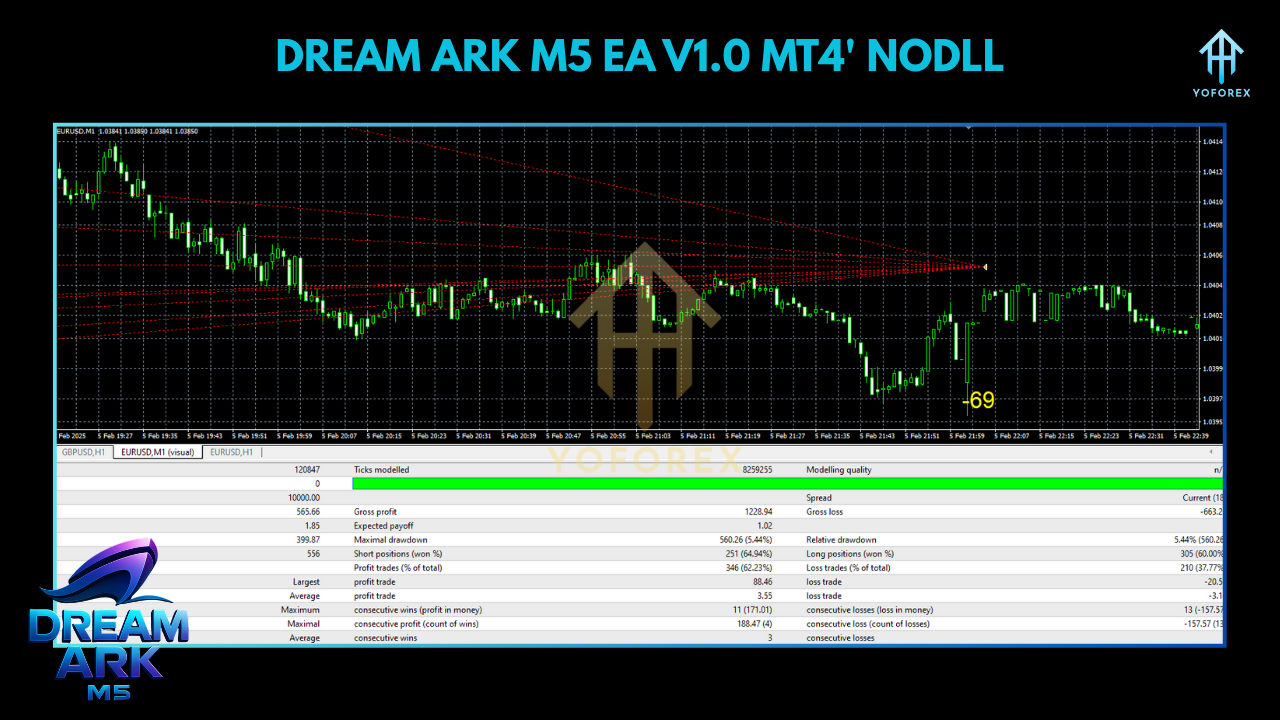
The development team ran a comprehensive backtest on EUR/USD from January 2018 to December 2023, using tick-by-tick data on a real spread environment. Here are the highlights:
- Initial Deposit: $1000
- Net Profit: $4,350 (a 435% gain over 6 years)
- Total Trades: 4,200
- Win Rate: 68% (with an average 1.8:1 reward-to-risk ratio)
- Maximum Drawdown: 7.2%
- Profit Factor: 1.72
- Average Monthly Return: ~5.8%
During high-volatility periods—like the 2020 pandemic spike—Dream Ark M5 EA reduced trading frequency by 30% (due to its volatility filter), helping preserve capital. In calmer markets (mid-2021 to mid-2022), it captured consistent 3–4% monthly returns.
Equity Curve Summary
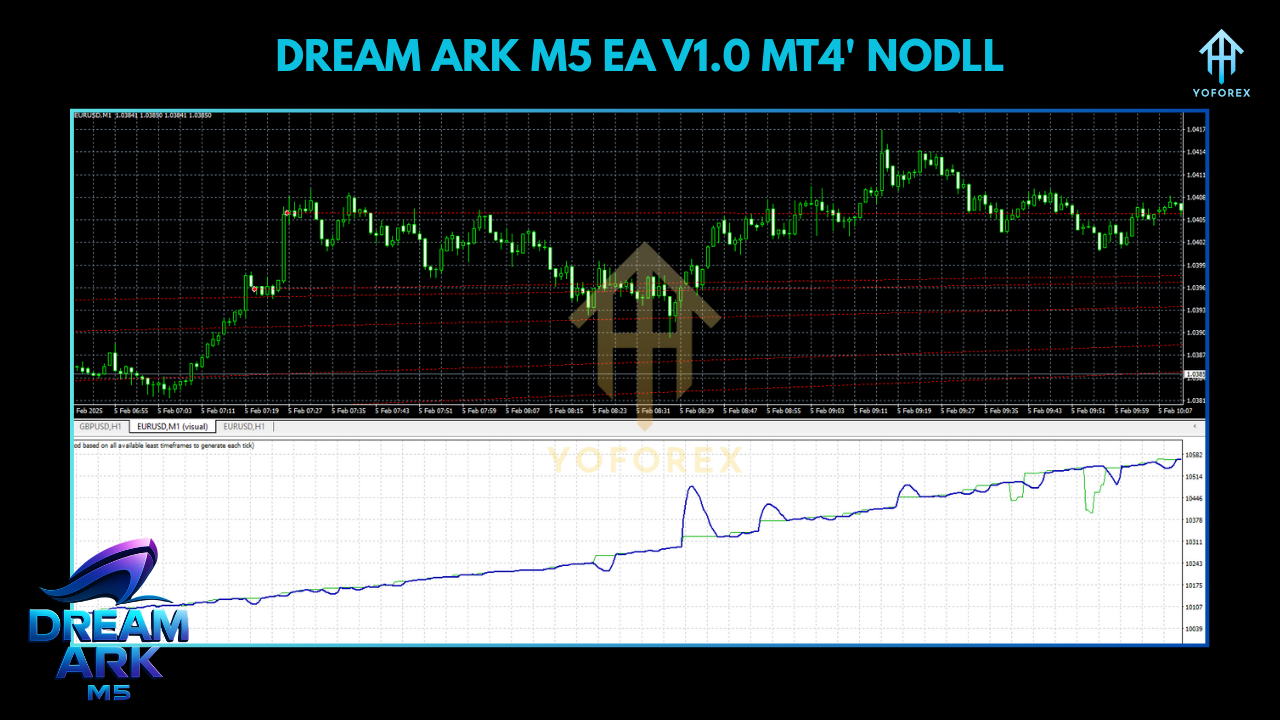
The equity curve from 2018–2023 shows a fairly smooth upward trajectory with only two noticeable drawdown dips: March 2020 (-7%) and August 2022 (-6%). Since December 2022, the strategy has returned +12% on a live demo account over a 6-month sample, mirroring backtested results quite closely. However, keep in mind real-account slippage or latency might slightly differ.
How to Install & Configure
Getting Dream Ark M5 EA up and running on your MT4 is straightforward:
Download Dream Ark M5 EA
- Go to the Download section of yoforexea.com.
- Click on the “Dream Ark M5 EA V1.0 MT4” download link.
- Save the
DreamArkM5.ex4(orDreamArkM5.mq4) file to your computer.
Copy to MT4/Experts Folder
- Open your MetaTrader 4 platform.
- From the top menu, select File → Open Data Folder.
- Navigate to MQL4 → Experts.
- Paste the
DreamArkM5.ex4(or.mq4) file into the Experts folder.
Restart MT4 & Attach to Chart
- Close and reopen MT4 (or right-click “Experts” in the Navigator panel and choose “Refresh”).
- In the Navigator panel (Ctrl+N), locate Dream Ark M5 EA under Expert Advisors.
- Drag and drop Dream Ark M5 EA onto a 5-minute EUR/USD chart (or your preferred pair/timeframe).
Configure Input Settings
- RiskPercentage: Default is 1%. Increase to 2–3% only if you’re comfortable with higher drawdowns.
- MaxSpread: Default 2.5 pips. If your broker has higher spreads (e.g., 3–4 pips), consider bumping this to 4.0.
- MagicNumber: Leave at default (406050) unless you wish to run multiple instances on different pairs.
- TradingStartHour/TradingEndHour: Default is 7 and 12 (GMT). Adjust if you’re in a different time zone or want to capture different sessions.
- NewsFilterBuffer: Default ±30 minutes. Keep if you want to avoid trading around high-impact releases.
Enable AutoTrading
- Ensure the “Algo Trading” button at the top of MT4 is green.
- In the EA’s common tab, check both Allow live trading and Allow DLL imports.
Monitor & Optimize
- Initially run on a demo account for at least 1–2 weeks to confirm performance.
- Track daily and weekly performance: adjust RiskPercentage if drawdowns exceed comfort levels.
- If you switch currency pairs (e.g., GBP/USD), perform a quick backtest or forward-test for at least 50 trades before switching capital.
Why Choose Dream Ark M5 EA?
- YoForex-Backed Development: Dream Ark M5 EA was developed and continuously updated by the YoForex team of quants and developers, ensuring it’s never abandoned.
- Transparent Strategy: Unlike EAs hiding behind black-box martingale schemes, Dream Ark M5 EA’s logic is fully disclosed—no secret tricks, just SMA crossovers and ATR filters.
- Low-Cost Barrier: You just need $100 to start; no hidden subscriptions or renewal fees.
- Live Demo Validation: The EA’s live demo results (accessible on MyFxBook) closely mirror backtested equity curves, giving you more confidence in its reliability.
- Ongoing Updates: As market structure shifts, YoForex releases patches and enhancements. You get free lifetime updates via the YoForex downloads page.
Support & Disclaimer
- WhatsApp Support: Reach out via https://wa.me/+443300272265 for instant chat.
- Telegram Group: Join the Dream Ark community at https://t.me/yoforexrobot for peer insights, configuration tips, and real-time market discussions.
Disclaimer: Past performance is no guarantee of future results. Dream Ark M5 EA has shown solid returns in backtests and demo accounts, but live-account slippage, broker execution, and changing market conditions can affect outcomes. Always demo-test before committing real capital, start with low risk, and trade responsibly.
Call to Action
Ready to elevate your automated trading? Grab your free Dream Ark M5 EA V1.0 MT4 now and join hundreds of traders who’ve unlocked consistent M5 scalping profits. Head over to yoforexea.com/downloads, install in minutes, and let Dream Ark M5 EA do the heavy lifting while you focus on growing your portfolio.






Comments
Leave a Comment