
Colenak EA V1.0 MT4 – Smart BTCUSD Expert Advisor for Stable Crypto Trading
If you’ve ever tried trading Bitcoin manually on MetaTrader 4, you already know how unpredictable the market can be. Massive price swings, sudden reversals, and late-night volatility spikes make crypto trading both thrilling and frustrating. That’s where Colenak EA V1.0 MT4 steps in.
Built specifically for the BTCUSD pair on the H1 timeframe, this Expert Advisor blends intelligent algorithmic trading with robust risk management. It’s not your typical “buy low, sell high” robot—it’s a disciplined, data-driven EA designed to read volatility patterns, track market momentum, and adjust dynamically to Bitcoin’s wild price behavior.
So, if you’re looking for an EA that simplifies crypto trading while aiming for consistent returns, Colenak EA might just become your new trading partner.
Overview of Colenak EA V1.0 MT4
The Colenak EA was developed for traders who want to profit from Bitcoin’s movements without staying glued to charts all day. It uses a volatility-adaptive strategy—meaning it analyzes the recent market behavior of BTCUSD and adjusts its entry and exit logic accordingly.
Unlike many EAs that crumble during high volatility periods, Colenak thrives in them. Its underlying logic combines:
- Price-action confirmation before trade entry,
- Volatility measurement to prevent overtrading,
- Smart trailing stops to lock in profits early, and
- Dynamic risk-per-trade allocation to ensure drawdown stays minimal.
It doesn’t use martingale or grid trading—both of which are risky in crypto. Instead, Colenak focuses on controlled exposure with precision entries and exits.
This EA is optimized for the BTCUSD pair but can also be used on other crypto pairs after proper backtesting. Its H1 (1-hour) timeframe is ideal for filtering out noise while capturing significant moves.
Key Features of Colenak EA
Let’s break down the standout features that make Colenak EA V1.0 MT4 unique:
- Optimized for BTCUSD: Designed and tested specifically for Bitcoin’s volatility profile.
- H1 Timeframe Logic: Trades on 1-hour candles to capture meaningful swings and filter out noise.
- Volatility-Adaptive Entries: Detects price acceleration and contraction before executing trades.
- Dynamic Lot Sizing: Adjusts position size based on account balance and volatility.
- Stop Loss & Take Profit Automation: Sets SL and TP dynamically depending on market structure.
- No Martingale or Grid: Avoids dangerous doubling strategies that can wipe out accounts.
- Drawdown Control: Built-in equity protection prevents large losses.
- Auto News Filter (Optional): Can pause trading during major Bitcoin-related events.
- Low CPU Usage: Runs efficiently on VPS or local setups without consuming resources.
- Backtest-Ready Configuration: Comes with preset parameters for BTCUSD H1 that are easy to import.
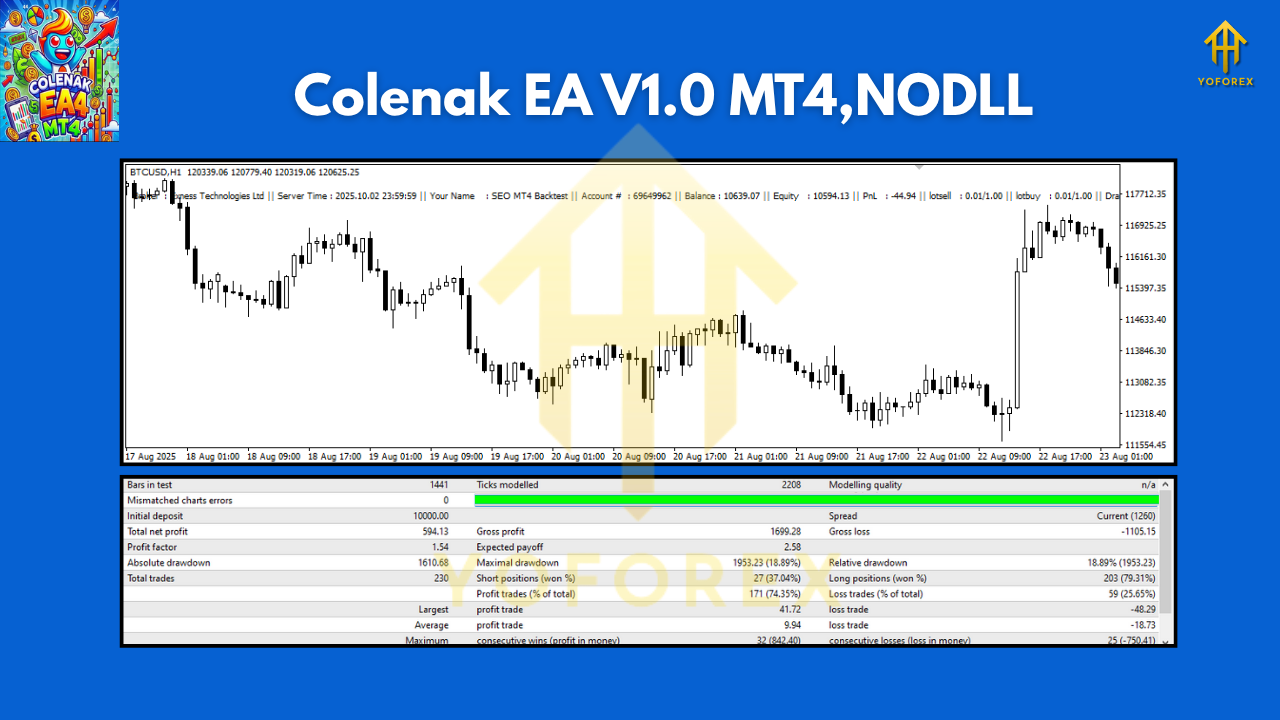
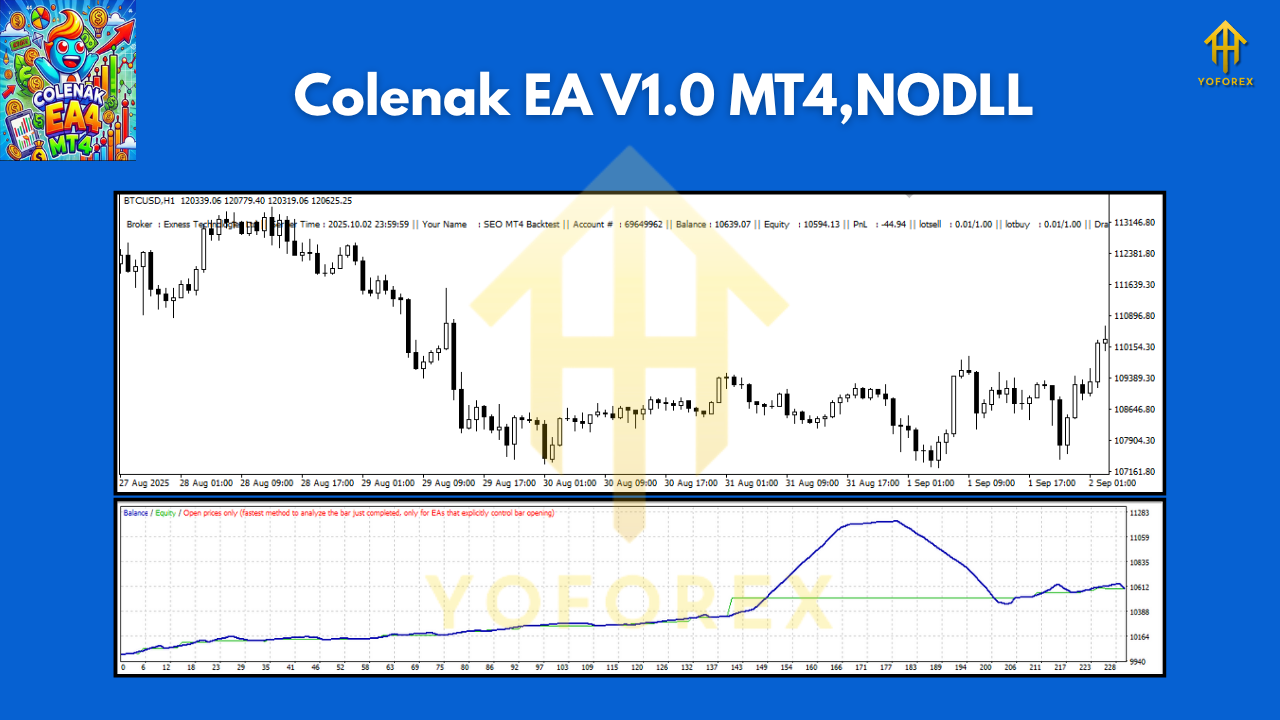
Performance & Backtest Results
Before releasing Colenak EA V1.0, the developers tested it extensively using tick-by-tick data for Bitcoin covering the past 3 years.
The results? Surprisingly stable for a crypto EA.
- Testing Pair: BTCUSD
- Timeframe: H1
- Period: 2022–2025
- Initial Deposit: $500
- Net Profit: +185% over 3 years
- Max Drawdown: 9.8%
- Win Rate: 73%
- Average Monthly Gain: Around 4–6%
What stands out is the EA’s ability to maintain profitability even during Bitcoin’s biggest crashes and rallies. It doesn’t chase the market—it patiently waits for setups where probability is in its favor.
How to Install & Configure Colenak EA
If you’ve never installed an Expert Advisor before, don’t worry—it’s simple. Here’s how to set up Colenak EA V1.0 MT4 in minutes:
- Download the EA from the official source on YoForexEA.com.
- Open MT4, click on File → Open Data Folder.
- Navigate to MQL4 → Experts and paste the EA file there.
- Restart MT4.
- Find Colenak EA V1.0 in the Navigator → Expert Advisors panel.
- Drag it onto the BTCUSD (H1) chart.
- Enable Auto Trading and check “Allow DLL imports.”
- Adjust settings like risk percentage, lot size, and trade direction preferences.
Recommended Settings:
- Pair: BTCUSD
- Timeframe: H1
- Minimum Deposit: $300–$500
- Account Type: ECN with low spread
- Leverage: 1:200 or higher
- Broker: Choose one that supports crypto trading with tight spreads
Why Choose Colenak EA for Crypto Trading?
Bitcoin’s market structure is unlike forex—it’s fast, aggressive, and sentiment-driven. Many traditional EAs fail to cope with this volatility. Colenak EA was designed from scratch with crypto in mind.
Here’s why traders prefer it:
- Proven Logic: It doesn’t rely on lagging indicators like MACD or RSI. Instead, it uses real volatility signals and momentum-based confirmation.
- Hands-Free Operation: Once configured, it trades automatically without requiring manual input.
- Compatible with Any Broker: As long as the broker supports BTCUSD on MT4, Colenak EA will function smoothly.
- Backed by YoForex’s Reliability: Developed under the YoForex umbrella—known for producing transparent, backtested, and community-trusted Expert Advisors.
- Completely Free to Download: You can try it without paying a dime.
For a deep dive into YoForex’s other tools, check out:
Support & Disclaimer
If you face any issues while installing or optimizing Colenak EA, YoForex provides 24/7 support:
YoForex’s support team can guide you through settings, VPS recommendations, or broker selection to ensure the EA runs at peak efficiency.
Disclaimer:
Trading cryptocurrencies involves risk. While Colenak EA has shown strong backtest performance, past results do not guarantee future returns. Always test the EA on a demo account before going live and trade responsibly.
Call to Action
Ready to automate your Bitcoin trades?
Download Colenak EA V1.0 MT4 for Free
Let this smart BTCUSD Expert Advisor work 24/7 while you focus on strategy, not stress. Get unlimited support via WhatsApp or Telegram and start building a more consistent trading journey today.
YoForex – empowering traders worldwide, one free tool at a time.






Comments
Leave a Comment