CM TSO EA V1.0 MT4 – The All-Round Trading Solution for Major Forex Pairs
Introduction
Forex trading can be a highly profitable venture, but it requires precision, strategy, and constant monitoring. For traders who want to automate their trading strategies and reduce emotional decision-making, Expert Advisors (EAs) are a powerful tool.
The CM TSO EA V1.0 MT4 is an advanced automated trading solution designed for major forex pairs, offering flexibility for any timeframe. Whether you prefer short-term scalping or long-term trend following, CM TSO EA adapts to your strategy, making it a versatile tool for all types of traders.
In this blog post, we’ll explore what makes CM TSO EA a valuable asset for your forex trading journey, its key features, setup instructions, and why it could be the perfect addition to your trading toolkit.
Overview
The CM TSO EA V1.0 MT4 is designed to be a multi-functional expert advisor that works seamlessly with major forex pairs like EUR/USD, GBP/USD, USD/JPY, and more. This EA can operate across any timeframe, making it adaptable to different trading styles, whether you are a scalper, day trader, or swing trader.
The EA works by identifying key market entry points and using dynamic stop-loss and take-profit levels to maximize profits while minimizing risk. The system is designed to be user-friendly and easy to set up, with pre-configured settings that work effectively in a range of market conditions.
Key Features of CM TSO EA V1.0 MT4
- Multi-Pair Compatibility – Works seamlessly on EUR/USD, GBP/USD, USD/JPY, and other major forex pairs.
- Any Timeframe Flexibility – Perfect for M1 scalpers or D1 swing traders.
- Multi-Strategy Support – Choose between trend-following and countertrend strategies.
- Dynamic Risk Management – Adjusts trade sizes based on account equity to ensure steady risk control.
- No Martingale or Grid – Reduces the risk of excessive drawdowns.
- Advanced Trade Filters – Trades only during favorable market conditions.
- Trailing Stop Functionality – Automatically adjusts stop-loss levels to lock in profits.
- Built-In News Filter – Helps avoid trading during volatile news events.
- Customizable Settings – Adjust the parameters to fit your trading style and preferences.
- Low Drawdown Approach – Designed to maintain a balanced risk-to-reward ratio.
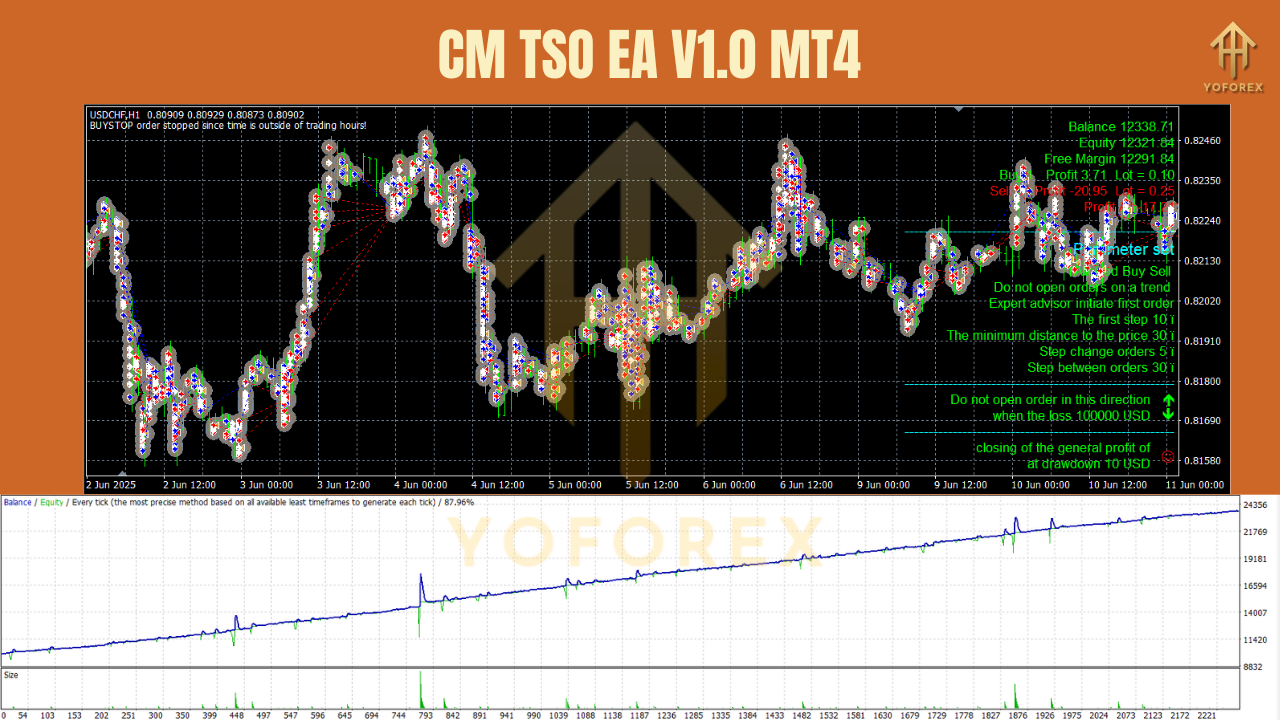
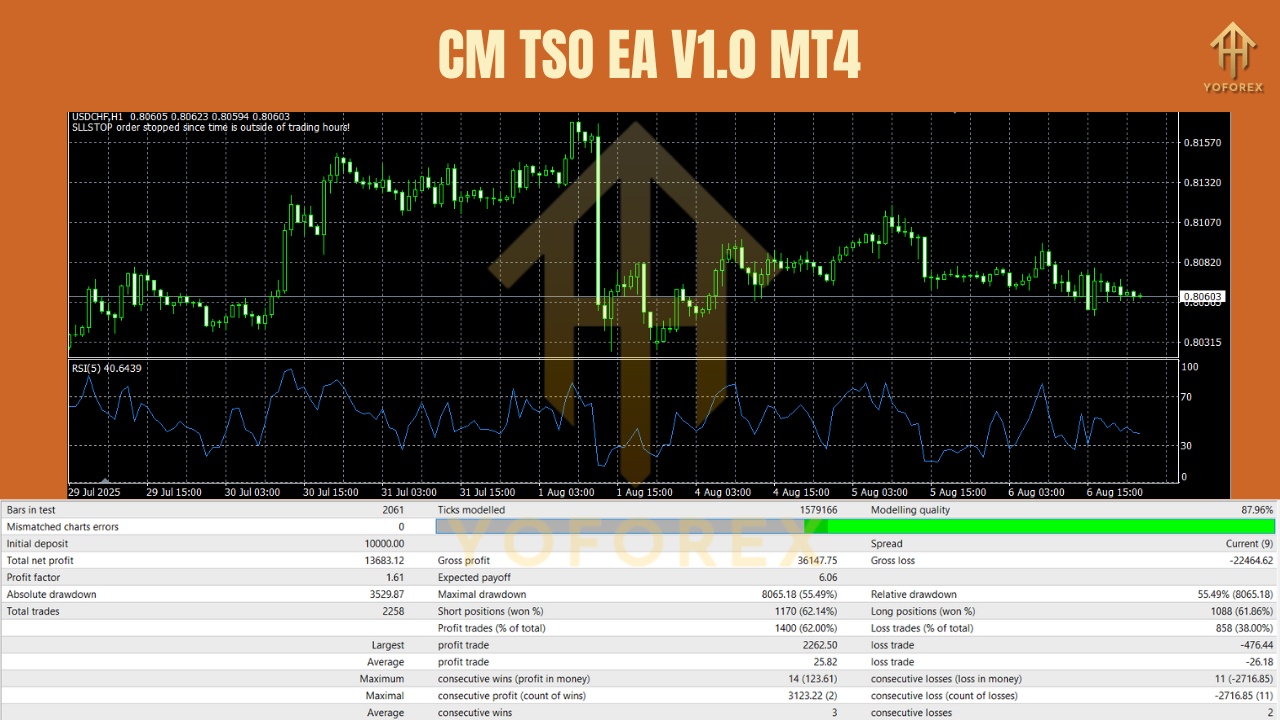
Backtest & Performance Review
CM TSO EA has been tested on various major forex pairs using MT4 backtesting and real-time trading to evaluate its performance.
EUR/USD H1 Test Results:
- Win Rate: ~73%
- Risk-Reward Ratio: 1:1.5
- Max Drawdown: ~7%
- Best Trading Hours: London and New York session overlap.
GBP/USD H1 Test Results:
- Win Rate: ~71%
- Average Trade Duration: 10–20 minutes.
- Performance in Volatile Markets: Stable, with risk filters preventing large drawdowns.
On USD/JPY, the EA showed strong performance during low-volatility market periods. It was also noted that using it with ECN brokers improved execution times and overall results.
How CM TSO EA Works
The CM TSO EA uses a comprehensive trading strategy that incorporates several filters and indicators:
- Trend Detection – Identifies the dominant market trend using moving averages and price action.
- Entry Signals – Waits for confirmation from multiple indicators (e.g., RSI, MACD, moving averages) to trigger entries.
- Risk Management – Sets dynamic stop loss and take profit targets based on market volatility.
- Exit Logic – Uses trailing stops and breakeven strategies to lock in profits.
This combination of filters ensures that CM TSO EA avoids false signals, trades with the market’s momentum, and maximizes gains while minimizing risk.
How to Install & Set Up CM TSO EA
- Download the EA File
You will receive a.ex4file for the CM TSO EA. - Copy to MT4 Folder
Go toFile → Open Data Folder → MQL4 → Expertsand paste the.ex4file. - Restart MT4
Close and reopen your MT4 platform so that the EA is loaded into the Navigator. - Attach the EA to a Chart
Drag the CM TSO EA from the Navigator onto your desired currency pair chart (e.g., EUR/USD on H1). - Load the Set File
- Click on Load in the EA settings window and select the pre-configured set file for your pair and timeframe.
- Adjust parameters as needed (e.g., risk percentage, stop-loss settings).
- Enable Auto Trading
Click the AutoTrading button in MT4 to allow the EA to start working automatically.
Why Choose CM TSO EA V1.0 MT4?
CM TSO EA stands out for its flexibility and risk management features, which are often lacking in other EAs. It offers:
- Multiple trading strategies to adapt to different market conditions.
- Risk-optimized trading with built-in safeguards against major losses.
- Customizable parameters, allowing traders to tailor the EA to their personal preferences.
- Any timeframe compatibility, so it works for scalpers and swing traders alike.
This makes CM TSO EA a reliable trading tool for both beginners and experienced traders.
Best Practices for Using CM TSO EA
- Use a VPS for 24/5 operation and low latency.
- Test on a demo account to fine-tune settings and become familiar with trade patterns.
- Adjust risk settings based on your account size to maintain proper risk-to-reward ratios.
- Avoid trading during high-impact news unless you have the built-in news filter activated.
- Monitor the EA periodically to ensure it’s functioning as expected.
Support
If you need assistance, you can contact our support team:
- WhatsApp: Click Here
- Telegram: Join Here
Final Thoughts & Call to Action
The CM TSO EA V1.0 MT4 is a versatile and reliable Expert Advisor for major forex pairs, capable of adapting to any timeframe and trading style. With its combination of advanced risk management and multi-strategy capabilities, it’s a perfect choice for traders who want to automate their trading without sacrificing control.
Download CM TSO EA today and start trading with confidence.
Full support available via WhatsApp & Telegram.
YoForex – empowering traders worldwide, one strategic trade at a time.
Join our Telegram for the latest updates and support






Comments
Leave a Comment