Introduction
Are you tired of missing profitable buy setups in the forex market? If so, the Bull Entry Indicator MT4 might be exactly what you need to regain confidence in your trading decisions. Designed for MetaTrader 4, this powerful tool helps traders identify optimal entry points when bullish momentum is building. In this blog post, we’ll explore how the Bull Entry Indicator MT4 works, its core advantages, and how you can seamlessly integrate it into your trading routine. Whether you’re a beginner or seasoned trader, this indicator aims to simplify your analysis and give you clearer signals—so you can focus on executing trades rather than second-guessing them.
Overview
At its core, the Bull Entry Indicator MT4 is engineered to detect the earliest signs of upward price movement. Instead of waiting for candles to close or relying solely on lagging oscillators, this indicator employs a combination of moving average crossovers and momentum thresholds to signal when bullish pressure is mounting. It scans multiple time frames—from M5 to H4—simultaneously, providing you with an aggregated view of market sentiment. The result? Early warning of potential uptrends that might otherwise go unnoticed until it’s too late.
Developed by seasoned MQL4 coders, the Bull Entry Indicator MT4 has undergone extensive backtesting on major currency pairs (EURUSD, GBPUSD, USDJPY) and exotic crosses. Real-world traders have reported improvements in their win rates and quicker reaction times to market reversals. Of course, no indicator is foolproof; prudent risk management remains essential. But by offering clear, rule-based entry alerts, this MT4 indicator empowers you to trade with greater conviction.
Key Features
- Multi-Timeframe Signal Aggregation: Combines signals from M5, M15, M30, and H1 to confirm bullish momentum.
- Customizable Moving Averages: Choose between simple, exponential, or weighted MA types, with adjustable periods to suit your strategy.
- Momentum Oscillator Filter: Incorporates a built-in RSI filter to avoid false breakouts when the market lacks genuine buying strength.
- Visual Alert System: Popup alerts, email notifications, and push notifications to mobile MT4 when a bull entry condition is met.
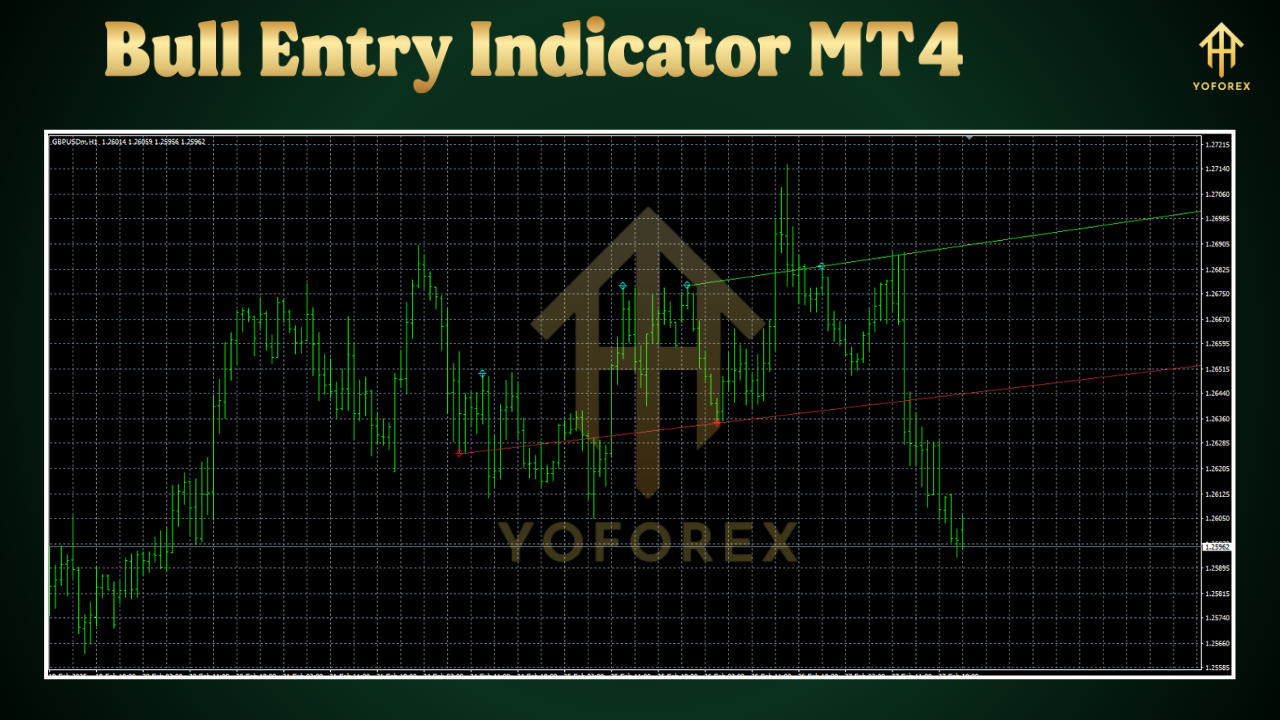
- Color-Coded Arrows: Green arrows appear on the chart precisely where you should consider opening a long (buy) position.
- Alerts for Multiple Pairs: Configure the indicator to scan your watchlist of up to five currency pairs simultaneously.
- Built-In Trend Strength Meter: Gauges the strength of the current uptrend on a scale of 1–100, with higher values indicating stronger momentum.
- Low Computational Load: Optimized to run smoothly on any PC or VPS; negligible impact on CPU usage even when running on multiple charts.
- User-Friendly Input Panel: Adjust key parameters like MA period, RSI threshold, and timeframes without editing code.
- Backtest-Ready Configuration: Includes recommended settings file so you can replicate developer-tested results in MT4’s Strategy Tester.
How It Works
The Bull Entry Indicator MT4 follows a step-by-step logic to pinpoint favorable buy opportunities:
- Moving Average Crossover Confirmation: The indicator tracks two moving averages—a faster MA (e.g., 21-period) and a slower MA (e.g., 55-period). When the fast MA crosses above the slow MA on a selected timeframe, it suggests that bullish momentum is starting to build.
- Momentum Oscillator Check: To avoid trading in choppy conditions, the tool references an internal RSI filter (default set to 14-period). Only when RSI is above a user-defined threshold (e.g., 50) does the indicator consider the MA crossover valid. This dual-filter approach reduces false entries.
- Multi-Timeframe Alignment: Instead of relying on a signal from a single chart, the indicator verifies that at least two higher timeframes (e.g., H1 and H4) also display bullish conditions—such as price above a long-term MA or a rising trend strength meter. This ensures that trades align with broader market sentiment.
- Visual & Audible Alerts: Once all conditions align—MA crossover, RSI filter, and multi-timeframe confirmation—the Bull Entry Indicator MT4 plots a green arrow below the bullish candle. A popup alert notifies you instantly, and you can opt to receive an email or push notification so you never miss a signal, even when you’re not staring at your screen.
- Exit Suggestions: While primarily focused on entry, the indicator also features a simple exit suggestion based on a trailing stop. When the opposite crossover occurs (fast MA crossing below slow MA) or the RSI dips below a secondary threshold (e.g., 45), a red arrow appears, hinting at potential profit-taking or stop-loss adjustments.
By layering filters in this manner, the Bull Entry Indicator MT4 strikes a balance between early signals and reliable confirmation. It’s especially helpful in trending markets, where catching the initial wave can significantly boost risk-to-reward outcomes.
Installation & Setup
Getting started with the Bull Entry Indicator MT4 is straightforward:
- Download & Copy Files: After purchasing or downloading the free version, locate the “BullEntryIndicator.mq4” (and accompanying “BullEntrySettings.ex4”) files. Copy them into your MetaTrader 4 directory under
MQL4/Indicators. - Restart MT4: Close your platform and reopen it. In the Navigator panel, expand “Indicators” and you should see “Bull Entry Indicator MT4” in the list.
- Attach to Chart: Drag and drop the indicator onto the desired chart (EURUSD, M15, for example). A settings window will appear where you can tweak parameters:
Fast MA Period: Default 21
Slow MA Period: Default 55
MA Type: SMA, EMA, or WMA
RSI Period: Default 14
RSI Buy Threshold: Default 50
Signal Timeframes: Select M5, M15, M30, H1, H4 as needed
Alert Options: Enable/disable popups, emails, push messages
- Load Recommended Settings (Optional): If you want to match developer backtests, click “Load” and select “BullEntry_DefaultSettings.set.” This file automatically configures all inputs for a balanced risk profile.
- Configure Alerts: In the “Common” tab, ensure “Allow DLL imports” and “Allow WebRequest for listed URL” are checked if you plan to receive email or push notifications. Enter your SMTP details or mobile push credentials under “Alerts.”
- Save Template: Once you’re satisfied, right-click anywhere on the chart and choose “Template → Save Template.” Name it “BullEntry_YourTemplate.tpl.” Now any time you open a new chart, simply apply this template, and the Bull Entry Indicator MT4 loads with your preferred settings.
Tips & Best Practices
• Combine with Support/Resistance: While the indicator provides solid entry signals, reinforcing them with established support and resistance zones can increase win probability. Look for green entry arrows near key horizontal levels.
• Trade Major Pairs First: EURUSD, GBPUSD, and USDJPY tend to have tighter spreads and more reliable trends. Once comfortable, test on cross pairs like AUDNZD or GBPJPY.
• Timeframe Harmony: If you see a buy arrow on M15, make sure M1 or M5 doesn’t show extreme overbought readings. This way, you avoid entering right before a micro retracement.
• Risk Management: Always place a stop-loss below the most recent swing low. Consider risking no more than 1–2% of your account per trade. The Bull Entry Indicator MT4 only suggests entry; how you size your lot is still up to your strategy.
• Demo-Test New Parameters: If you adjust MA periods or RSI thresholds, run a quick backtest in MT4’s Strategy Tester. Confirm that you’re not overfitting to a handful of candles.
• Avoid News Zones: High-impact events (NFP, central bank decisions) can trigger erratic spikes. Consider disabling the indicator temporarily or reducing lot size during scheduled news releases.
⚡️Upgrade
If you’re ready to unlock pro-level features, consider upgrading to the Bull Entry Indicator MT4 Premium. The Premium edition includes:
- Auto Trendline Detection: Dynamic trendlines automatically drawn to highlight emerging channels.
- Advanced Filter Module: Integrates Stochastic and MACD filters to refine entry accuracy.
- Multi-Currency Scanner: A dashboard window that scans 28 Forex majors and minors, highlighting ready-to-trade pairs without switching charts.
- One-Click Trade Panel: Instantly place buy orders with preconfigured lot size, stop-loss, and take-profit via a convenient on-chart button.
- Lifetime Updates & Support: Access to future algorithm enhancements, direct ticket-based support, and inclusion in private Telegram group for strategy discussions.
To upgrade, visit the official download page or click on “⚡️Upgrade” within the indicator’s About panel. Pricing plans include monthly, quarterly, and one-time lifetime licenses.
Build with
- Platform: MetaTrader 4 (Windows)
- Language: MQL4
- Version Compatibility: MT4 Build 600 and above
- Required Libraries: Standard MQL4 library; no external DLLs required for basic functionality






Comments
Leave a Comment