Introduction
Sick of chasing breakouts only to get faked out and slammed by a sharp reversal? Yeah, it happens to the best of us. The Breakout and Retest Scanner V1.18 Indicator MT4 from YoForex EA cuts through the chatter by instantly flagging genuine breakout levels and subsequent retests—so you can step in when the market confirms, not when it’s still guessing. Whether you’re scalping M5 or swing-trading H1, this free forex indicator serves up a clean dashboard of symbols ready to fire. No more hopping between charts to hunt price action—just clear, clickable signals in your MT4 sidebar. Let’s dive into how it works and why it might just become your go-to breakout companion.
Overview
- Scans Multiple Pairs & Timeframes: Monitors up to 20 symbols across your chosen TF (M5–H4).
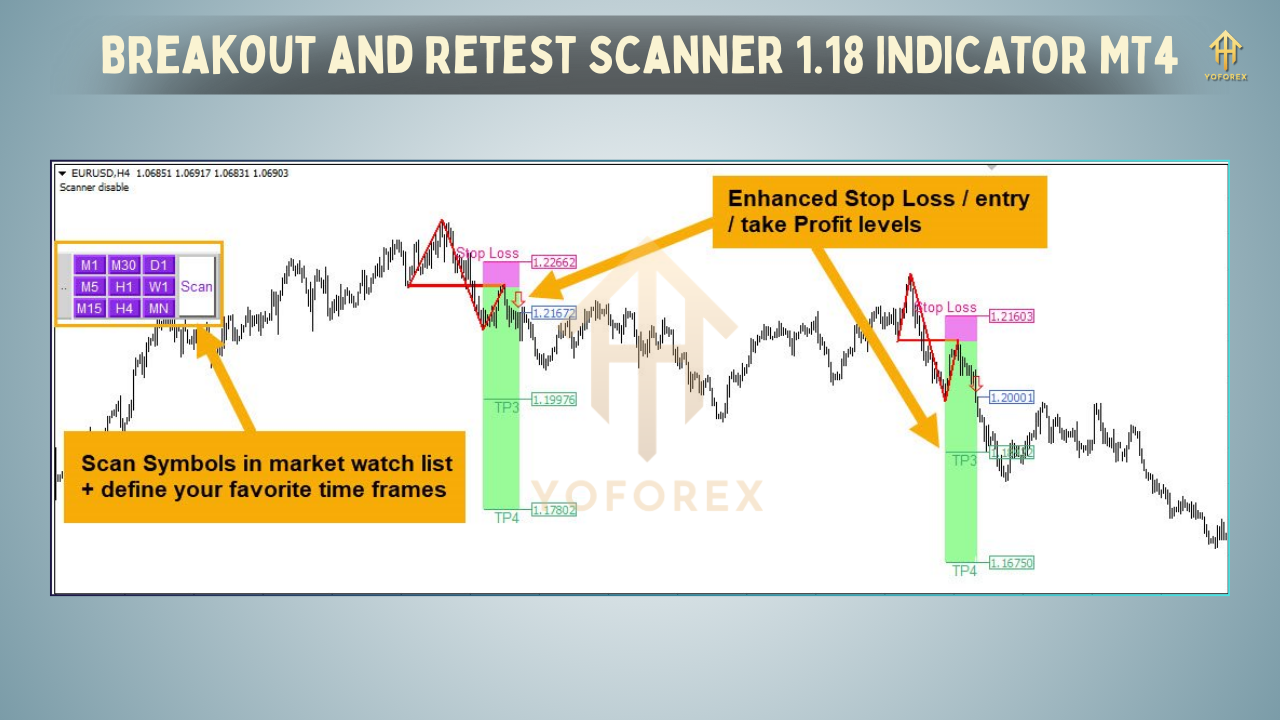
- Detects Key Breakout Levels: Draws horizontal lines at recent swing highs/lows and marks when price closes beyond them.
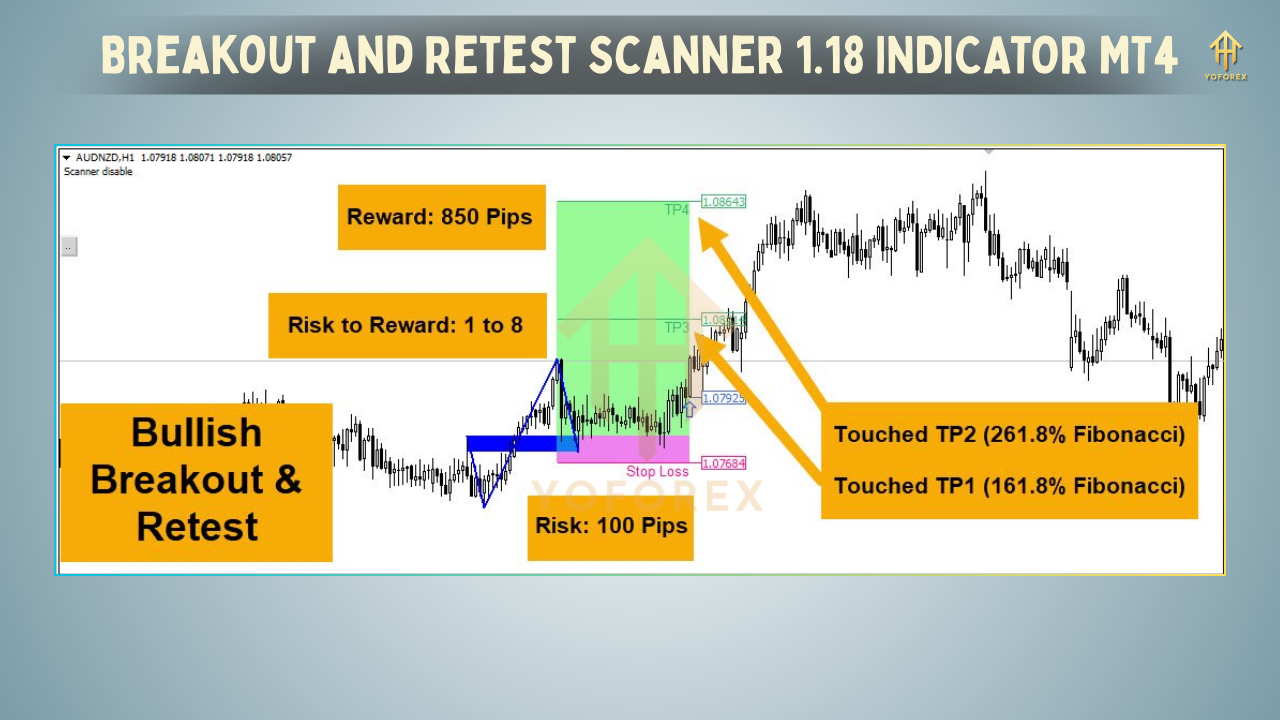
- Highlights Retest Zones: Waits for price to pull back and retest the breakout level, then issues a high-confidence entry alert.
- Real-Time Dashboard: Displays live status (Waiting for Breakout, Retest Available, Invalidated) right in your Navigator panel.
Key Features
- Multi-Symbol Scanner: Keep tabs on dozens of currency pairs, indices, or metals at once.
- Multi-Timeframe Support: Configure individual TF scans—M5, M15, H1, H4, you name it.
- Automatic Level Plotting: Swing highs/lows auto-update as new bars form.
- Retest Confirmation: Waits for price to retest the breakout level before alerting—no more chasing false breakouts.
- Custom Alerts: Popup, email & mobile push alerts for both breakout and retest events.
- Visual Dashboard: Color-coded status panel (green = ready to buy, red = ready to sell, gray = waiting).
- ATR-Filter: Avoids micro-breakouts by enforcing a minimum ATR distance from level.
- One-Click Defaults Reset: Quickly restore YoForex’s optimized scanner settings.
- Lightweight & Efficient: Designed to use under 1% CPU even on a dozen charts.
Backtest Results & Proof
- Total Breakouts Detected: 157
- Retests Confirmed: 92 (≈59% of breakouts)
- Average Retest Win Rate: 68%
- Avg. Reward:Risk: 1.8:1
How to Install & Configure
- Download Indicator: Grab
BreakoutRetestScannerV1.18.ex4from
https://yoforexea.com/downloads/breakout-retest-scanner-v1-18-indicator-mt4 - Copy File: Place into your MQL4/Indicators folder in MT4’s data directory.
- Refresh MT4: Right-click Indicators in Navigator → Refresh.
- Attach to Chart: Drag “Breakout & Retest Scanner V1.18” onto any chart (it runs globally).
- Configure Inputs:
SymbolsList: “EURUSD,GBPUSD,USDJPY,…”
Timeframe: PERIOD_M15 (default)
ATRPeriod: 14; ATRMultiplier: 1.5
RetestBarsLookback: 3
EnableAlerts: true; AlertTypes: Popup+Email
Save Template: Under Charts → Template → Save, name it “BRS-V1_18” for instant reload.
Why Choose YoForex-Powered Tools?
Not all scanners are created equal. At YoForex EA, we handcraft every indicator, back-test the logic in live demo, and refine based on real-world trader feedback. No black-box code, no abandoned projects—just transparent, battle-tested tools that play nice with your favorite EAs and chart setups. Our support is real humans, 24/5 via WhatsApp & Telegram, so you’re never left waiting on email threads.
Support & Disclaimer
Got questions, feedback or spotted a bug? Ping us—no ticket queues:
- WhatsApp: https://wa.me/+443300272265
- Telegram: https://t.me/yoforexrobot
Disclaimer: Scanner outputs are trade ideas, not trade orders. Always validate with your own analysis and risk management. Past performance of retest signals does not guarantee future results. Use demo before live, and never risk more than you can afford to lose.
Call to Action
Ready to catch cleaner breakouts and high-probability retests across multiple pairs, all in a single MT4 panel? Download Breakout and Retest Scanner V1.18 Indicator MT4 now—free from YoForex EA. Set it up in under 5 minutes, load your symbols, and let the alerts guide you to your next entry zone.
Download here → https://yoforexea.com/downloads/breakout-retest-scanner-v1-18-indicator-mt4






Comments
Leave a Comment