
Tired of false breakouts eating into your profits? You’re not alone. Many traders struggle to pinpoint genuine price reversals, only to get whipsawed by noise. Enter the Breaker Blocks Indicator MT4—an advanced price-action tool designed to filter out the chatter and highlight high-probability trade setups. In this blog, we’ll dive into what it is, how it works, its standout features, and practical ways to integrate it into your MetaTrader 4 workflow. By the end, you’ll see why so many traders—from newbies to pros—swear by this indicator.
What Is the Breaker Blocks Indicator MT4?
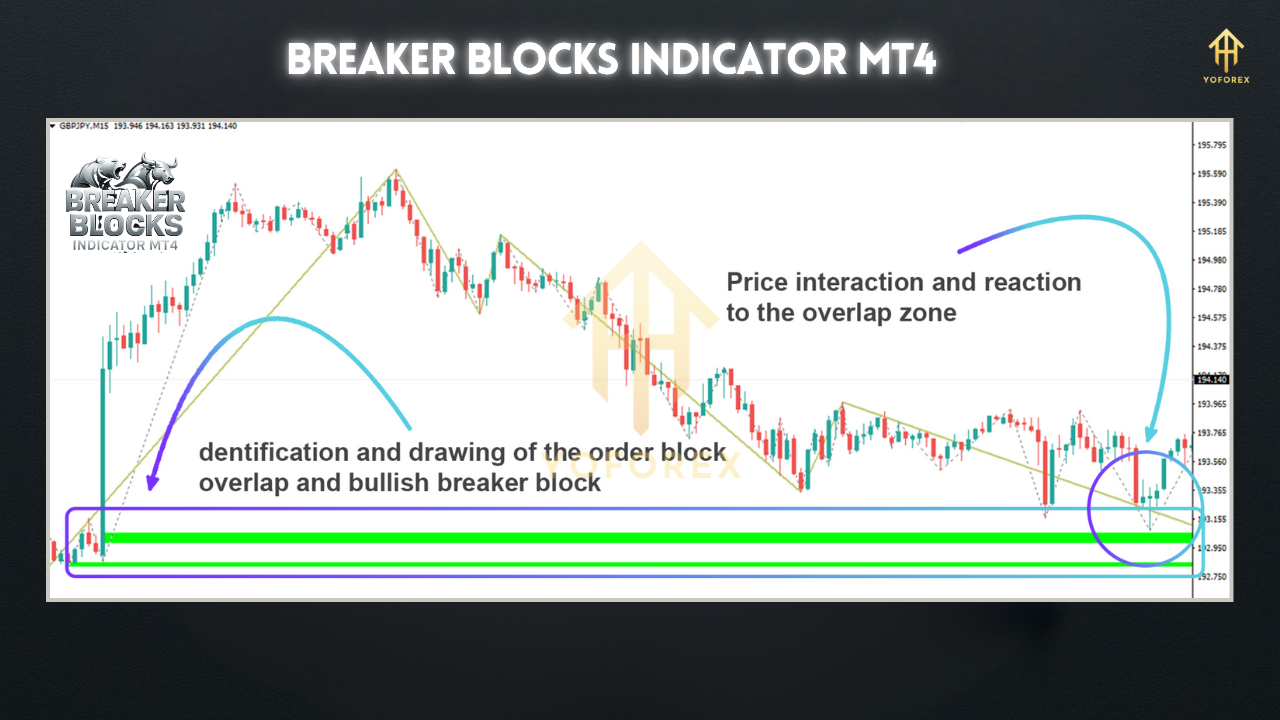
The Breaker Blocks Indicator is a custom MetaTrader 4 plugin that identifies key support and resistance zones based on “breaker blocks”—price zones where an initial breakout fails and reverses, signalling strong counter-trend momentum. Unlike traditional pivot-point tools, it dynamically adapts to market structure by:
- Spotting the origin of failed breakouts
- Drawing colored zones that represent potential entry and exit areas
- Issuing visual alerts when price interacts with those zones
Think of it as a “smart” supply-demand indicator that reacts to real price action rather than fixed Fibonacci levels or static pivots.
How It Works
- Detection of Breaker Blocks
• The indicator scans recent swing highs and lows.
• It identifies zones where price first breaks through a swing, then quickly reverses and closes back inside—marking a failed breakout. - Zone Drawing
• It then plots rectangular blocks around those failure zones.
• Bullish breaker blocks are shaded green (support), bearish ones red (resistance). - Alerts & Customization
• Pop-up and email alerts fire when price enters or exits these blocks.
• You control look-back period, block coloring, alert types, and more via the indicator’s settings panel.
Key Features
- Dynamic Support & Resistance based on real price-action failures
- Customizable Look-Back Period to suit scalping or longer-term strategies
- Visual Clarity with shaded blocks that don’t clutter your chart
- Multi-Timeframe Compatibility—apply on M1 to D1 without extra scripting
- Built-In Alerts (pop-ups, sounds, emails) to catch zone touches even when you’re away
- Lightweight Code—minimal CPU load, so it runs smoothly alongside other indicators
- No Repainting—once a block is drawn, it stays fixed, giving you reliable historical context
- Adjustable Zone Sensitivity—tweak zone width to match different market volatilities
How to Install & Configure
- Download the Files
- Grab the
BreakerBlocks.ex4andBreakerBlocks.tplfrom your download source. - Copy to MT4 Directory
- Place
BreakerBlocks.ex4intoMQL4/Indicators - Place
BreakerBlocks.tplintoTemplates - Restart MetaTrader 4
- Close and reopen MT4 so the new indicator appears.
- Attach to Chart
- Navigate to Navigator > Indicators > Breaker Blocks Indicator, drag onto your preferred chart.
- Recommended Settings
- Look-Back Period: 50
- Zone Width (pips): 5
- Alert Type: Popup + Email
- Block Transparency: 70%
- Save as Template
- Hit Charts > Template > Save Template, name it “BreakerBlocks.” Next time, just load!
Practical Trading Strategies
- Zone Entry Trades: Wait for price to retest a bullish breaker block on a pullback, then enter long with a tight stop just below the zone.
- Trend Confirmation: In a strong uptrend, use bearish breaker blocks on higher timeframes (H4/D1) to gauge profit targets for long positions.
- Scalping Setups: On M5, watch block touches combined with RSI divergence for quick 5–10-pip scalps.
- Multi-Timeframe Alignment: Identify blocks on H1 and refine entries on M15 to boost win rate.
Why Choose the Breaker Blocks Indicator?
Breaker Blocks stands out because it’s built on raw price action—no lagging averages, no repainting lines, no guesswork. You get clear, objective zones that align with how institutional traders operate. Plus, the low CPU footprint means you can run it alongside your other favorite tools without slowdown.
Support & Disclaimer
If you hit any snags or need help tuning the settings, don’t hesitate to reach out on WhatsApp or Telegram. Our team is on standby to assist you. Remember, past performance doesn’t guarantee future results. Always test in a demo environment before going live, and apply strict risk management.
Call to Action
Ready to trade with precision? Download the Breaker Blocks Indicator MT4 now and start spotting high-probability trades today. Unlimited support is just a message away—get in touch on WhatsApp or Telegram anytime!






Comments
Leave a Comment