
Blessing EA V3.9.6.09 MT4: Comprehensive Review, Features, and Setup Guide
In the fast-paced world of forex trading, automated systems—or Expert Advisors (EAs)—have become essential tools for both novice and experienced traders. Among these, Blessing EA V3.9.6.09 for MetaTrader 4 (MT4) has earned a reputation for stability, flexibility, and robust risk management. Designed by J Talon LLC, this EA builds upon previous iterations to deliver an even more refined trading experience. Whether you’re looking to automate grid strategies, incorporate indicator-based entries, or tighten your risk controls, Blessing EA offers a versatile platform to streamline your trading operations.
Background and Development
Blessing EA traces its origins back to the development efforts of J Talon LLC (FiFtHeLeMeNt), with community contributions helping shape its evolution. Version 3.9.6.09, released on February 9, 2014, represents a mature stage of this EA’s lifecycle, emphasizing user customizability and performance consistency across various market conditions. Over the years, the EA has been honed through rigorous backtesting, community feedback, and the addition of advanced entry filters and risk parameters.
Key Features
Multi‑Strategy Trading Approach
Blessing EA is not confined to a single trading methodology. By default, it uses a moving average (MA) overlay to identify trend direction and lays out grid orders accordingly. For traders seeking additional precision, the Bollinger Bands (“BollingerEntry”) feature can be enabled. When the price breaches the upper or lower band, the EA places corresponding short or long positions, capitalizing on the mean‑reversion tendency of prices. A stochastic oscillator filter is also available to confirm entry signals, reducing the likelihood of false triggers during sideways markets.
Adaptive Grid and Entry Systems
Grid trading is at the heart of Blessing EA’s operational logic. The EA automatically spaces entry orders in predefined pip intervals, adjustable via the Grid Adjustment Factor (GAF). Setting GAF to 1 retains the default grid distance (25 pips), while values below 1 compress the grid (e.g., GAF 0.65 yields ~16‑pip spacing). Take‑profit levels scale in parallel (e.g., 32/64/128 pips) to capture favorable moves while the grid absorbs adverse fluctuations . This adaptive grid mechanism allows traders to tailor order spacing and profit targets to their risk appetite and account size.
Advanced Risk Management
To safeguard trading capital, Blessing EA incorporates several risk‑control features. The external variable EmergencyCloseAll can be toggled to instantly close all open orders in case of unexpected market events. The EANumber parameter ensures that multiple instances of the EA on different charts are uniquely identified by their Magic Numbers, preventing cross‑interference. Stop‑loss, take‑profit, and maximum drawdown thresholds are fully customizable, allowing traders to define acceptable loss limits and automate profit locking. These built‑in controls help mitigate the dangers of grid‑related martingale strategies.
Customizable Presets
One of Blessing EA’s strengths lies in its community‑driven set files. Presets for popular instruments—such as EURUSD (H1), GBPUSD (H1), and XAUUSD (M5)—are readily available, saving traders time on parameter optimization. These set files have been tested over extensive historical data (April 2016 to June 2018) and demonstrate stable returns when applied with the recommended risk settings. For XAUUSD, smaller lot‑size presets help control drawdown while maintaining profit potential. Users may also modify or create new set files to suit additional currency pairs and timeframes.
Performance and Backtesting
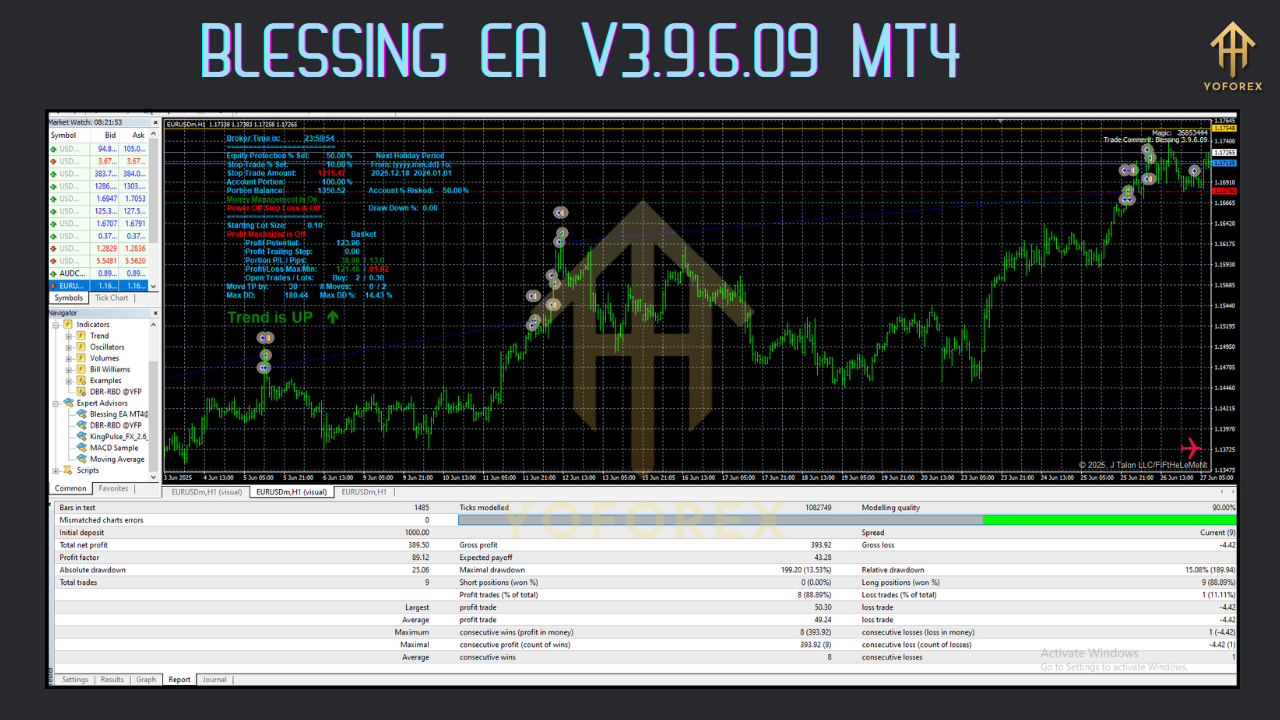
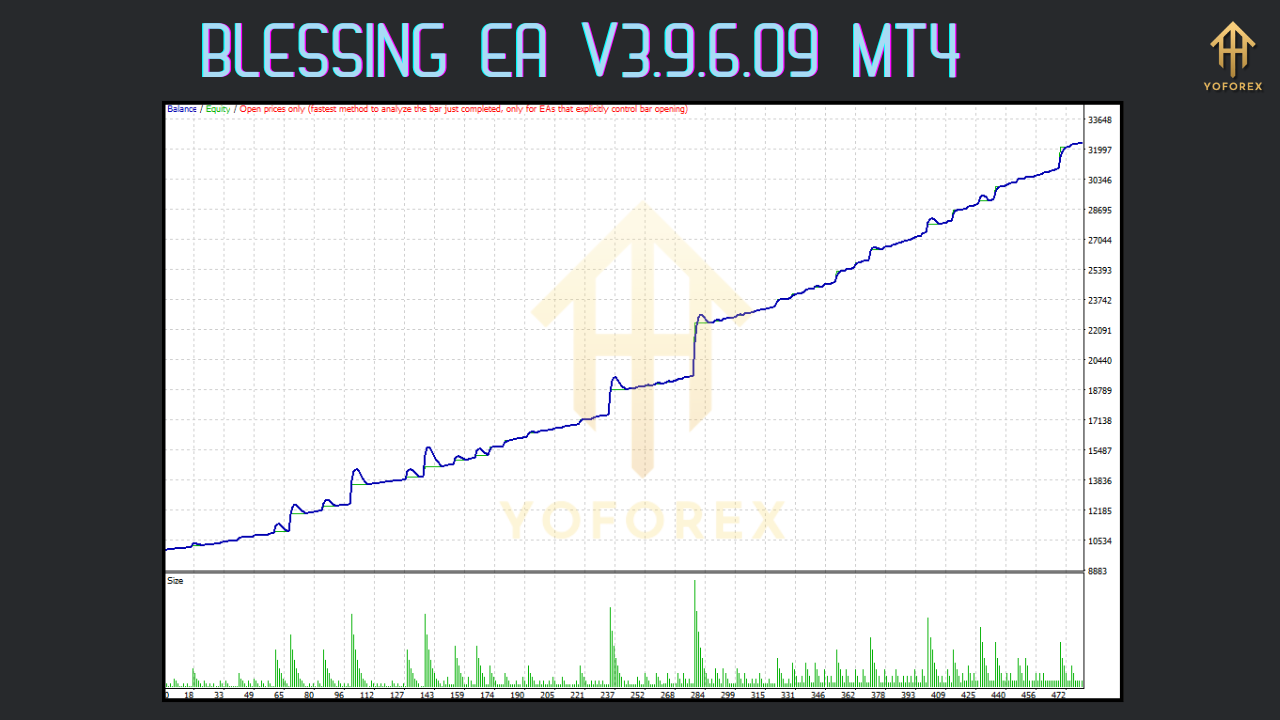
Community backtests of Blessing EA V3.9.6.09 reveal a well‑balanced performance profile. On a minimum recommended account balance of USD 3,000, traders can expect periodic drawdowns of USD 1,000–1,400 approximately 3–4 times per year. When the balance is maintained at USD 5,000 or higher, these drawdowns become less impactful and profit withdrawals can be scheduled regularly to safeguard capital. Testing has shown that the grid and BollingerEntry combination provides both reliable profits in trending conditions and controlled performance during ranging markets.
Recommended Settings
- Account Balance: Minimum USD 3,000; ideally USD 5,000+ to buffer drawdowns.
- Risk Per Trade: 0.5%–1% of equity, adjustable via lot‑size and stop‑loss parameters.
- Timeframes & Pairs:
EURUSD: H1
GBPUSD: H1
XAUUSD (Gold): M5 (reduced spread to 4, break‑even at 5).
- Grid Adjustment Factor (GAF): 0.65–1.2 based on desired grid density.
- BollingerEntry: Enabled for traders seeking tighter entry filters; recommended deviation at default (2).
- Stochastic Confirmation: Optional; use default %K and %D settings for additional safety.
Installation and Setup Guide
Download and Installation:
Place the
Blessing_v3.9.6.09.ex4file (or compile fromBlessing.mq4) into your MT4Expertsfolder.
Restart MT4 or refresh the
Navigatorpanel.
Attaching the EA:
Open the chart for your chosen instrument (e.g., EURUSD, GBPUSD, XAUUSD).
Drag “Blessing EA V3.9.6.09” onto the chart.
Loading Presets:
Click “Load” in the EA properties window and select your desired
.setfile.
Verify parameters such as
EmergencyCloseAll,EANumber,GAF, and BollingerEntry options.
Enabling Automated Trading:
Ensure “AutoTrading” is enabled in MT4.
Confirm that the smiley face appears in the upper‑right of the chart, indicating the EA is active.
Monitoring and Adjustments:
Observe the EA placing grid orders and managing positions.
Adjust
MaxDrawdownorLotSizeon the fly if account equity fluctuates significantly.
Best Practices and Risk Considerations
While Blessing EA V3.9.6.09 offers robust automation, traders should remain vigilant:
- Regular Profit Withdrawal: To maintain the recommended minimum balance, extract profits after sustained gains.
- Demo Testing: Always validate new presets on a demo account before going live.
- Spread Awareness: High spreads can undermine grid strategies, especially on M5 gold charts—use brokers with competitive spreads.
- News Events: Disable the EA during major economic announcements to avoid erratic price spikes.
- Diversification: Avoid running multiple high‑risk grid strategies simultaneously on the same account Forex Factory.
Conclusion
Blessing EA V3.9.6.09 MT4 stands out as a mature, community‑endorsed Expert Advisor that blends grid trading with indicator‑based entries and advanced risk controls. Its array of customizable parameters and preset files for major pairs and gold make it accessible to a wide spectrum of traders. By following recommended settings, employing diligent monitoring, and adhering to sound money‑management principles, traders can leverage Blessing EA to capture consistent returns while maintaining control over risk.






Comments
Leave a Comment