⚡️Upgrade your automated trading with AI MaxPro EA V2.01 MT4 — a high-performance Expert Advisor optimized for precision trading on the DE40 (DAX) index. Designed with modern market conditions in mind, this EA combines adaptive logic, volatility protection, and one-trade-at-a-time execution to deliver clean, data-driven performance.
AI MaxPro EA V2.01 offers traders an opportunity to explore smart automation without relying on risky martingale or grid strategies. By leveraging institutional-style filters and execution control, it provides reliable performance on demo environments while allowing traders to test advanced techniques without complex setup.
This guide will walk you through the key features, performance metrics, setup steps, and user feedback of AI MaxPro EA V2.01 — a top-tier candidate for your MetaTrader 4 toolkit.
Introduction to AI MaxPro EA V2.01
AI MaxPro EA V2.01 is an Expert Advisor for MetaTrader 4, tailored specifically for trading the DAX index (now known as DE40). Unlike conventional EAs that often engage in dangerous strategies like hedging or averaging down, this bot uses a single-entry strategy, focusing on clean exits and calculated entries.
The EA is programmed to analyze volatility and news data before opening a position. It operates best on the M15 timeframe, allowing for quick scalping or short-term trading while avoiding overexposure during major news events.
What Makes AI MaxPro EA Unique
AI MaxPro EA’s key differentiator is its simplicity combined with intelligent trade logic. Here are some features that make it a standout option:
Single-Trade Logic
The EA ensures that only one position is opened at any given time. This protects against drawdown caused by stacking or doubling positions.
Volatility Filter
Before initiating a trade, the EA checks real-time volatility data. If the market is too unstable or unpredictable, it skips trading.
News Filter
To protect against large spikes, the EA pauses activity during high-impact economic news events. This helps safeguard profits and avoid sudden losses.
Performance Tracking
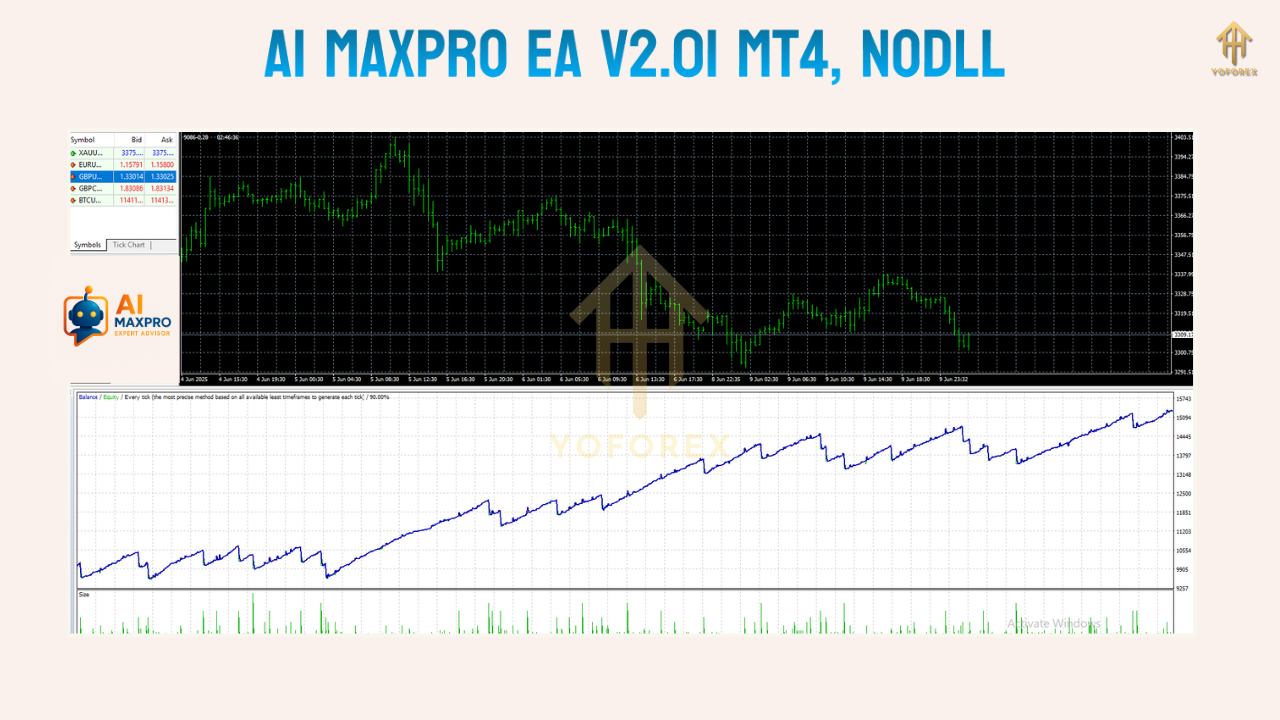
AI MaxPro EA has demonstrated strong results in demo environments, showing consistent profit curves with low risk and steady compounding behavior.
Compatible with All MT4 Brokers
Whether you're using a raw ECN or standard STP account, the EA runs efficiently with most broker types and trading conditions.
Demo Performance Snapshot
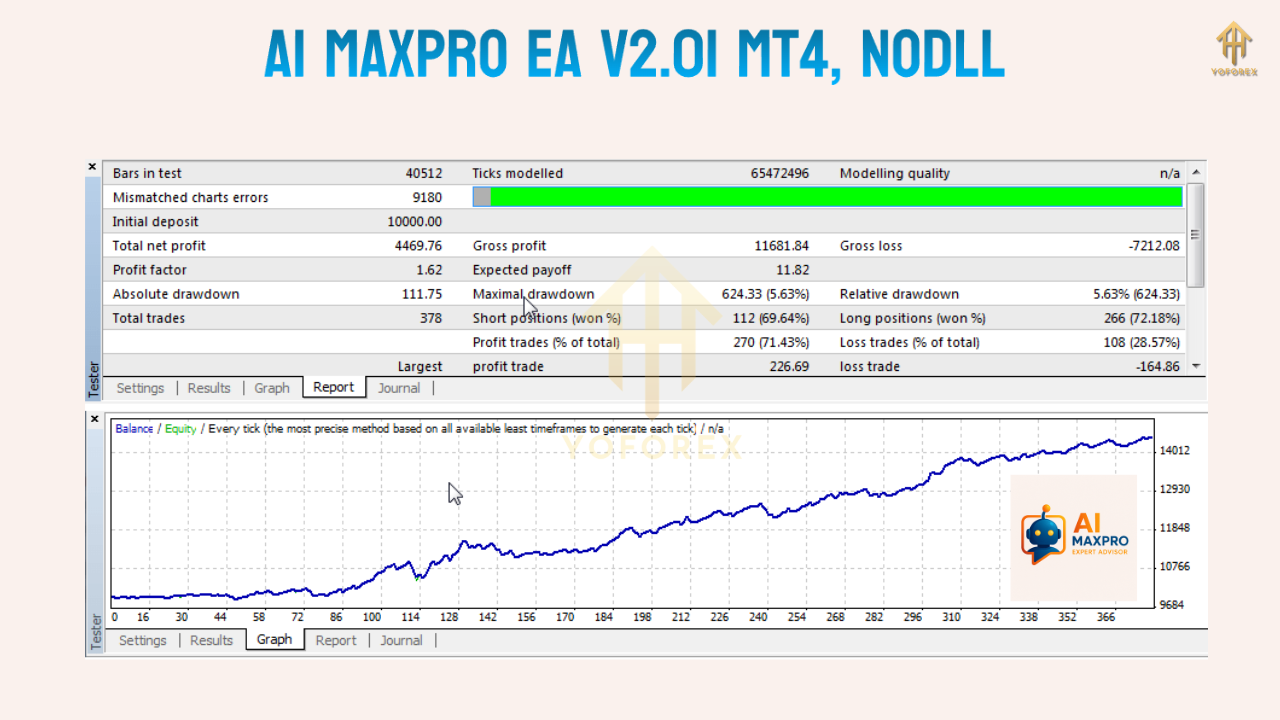
While demo performance doesn't guarantee future success, AI MaxPro EA V2.01 has made a mark with the following figures from long-term testing on demo accounts:
- Profit Gain: Over 150,000 percent
- Drawdown: Under 4 percent
- Total Trades: Over 16,000
- Win Rate: High, often around 85 percent
- Timeframe: M15
- Instrument: DE40 (DAX Index)
- Leverage Used: 1:500
These results are compelling, especially for traders looking for stable automated trading in a volatile instrument like DAX. However, it is critical to remember that such performance was achieved in demo environments and may differ under live market conditions.
How to Use AI MaxPro EA V2.01
Getting started with AI MaxPro EA is straightforward. After installing the EA file in your MetaTrader 4 platform, follow the steps below:
- Launch MetaTrader 4.
- Open a DE40 (DAX) chart and switch to the M15 timeframe.
- Attach the EA to the chart.
- Adjust settings such as lot size, risk percentage, and filters based on your preference or use the provided default set file.
- Enable AutoTrading in MT4.
- Monitor performance and let the EA execute trades based on built-in logic.
Recommended Environment
- Timeframe: M15
- Instrument: DE40 only
- Minimum Deposit: $100 (for demo)
- Leverage: 1:500
- Execution Type: Market execution preferred
- VPS: Recommended for optimal performance
Who Should Use AI MaxPro EA V2.01
This EA is ideal for:
- Beginners wanting to learn how EAs work in a low-risk environment.
- Traders looking for a single-entry strategy EA without risky tactics.
- DE40-focused scalpers and intraday traders.
- Anyone who prefers news-aware, volatility-sensitive bots.
Important Considerations
Before deploying AI MaxPro EA V2.01 on a live account, it’s important to conduct proper testing. Demo trading helps you observe its behavior, test drawdown, and identify optimal settings for your broker and conditions.
Tips for Successful Use
- Run the EA on a demo for at least 4 to 6 weeks.
- Test across various market sessions (London, New York).
- Always use a reliable VPS to avoid disconnects or lags.
- Use low-spread brokers to improve execution accuracy.
- Start with minimum lot size and scale as needed.
Community Insights
Traders in various online communities have shared positive experiences with this EA. While many agree that demo performance is strong, some caution against using it blindly on live accounts without thorough backtesting.
Feedback includes:
- “Good for structured risk exposure.”
- “Avoids dangerous trades during high-impact news.”
- “Easy to install and low maintenance.”
- “Would love to see live verified results.”
Final Thoughts
AI MaxPro EA V2.01 MT4 is a promising trading robot that provides traders with an efficient way to engage with the DAX index through MetaTrader 4. Its risk-conscious features like volatility and news filtering, along with single-trade logic, make it suitable for both beginners and experienced algorithmic traders.
It is best used as a learning tool or for refining your automated strategy approach in a demo setting. If you’re looking to safely experiment with expert advisors, AI MaxPro EA V2.01 provides a solid starting point.
Download Link (URL)
Download here






Comments
Leave a Comment