
Introduction
If you’ve been trading for a while, you probably already know how exhausting manual chart-watching can get. And honestly, with the forex markets moving 24/5, relying only on manual setups feels kinda limiting. That’s exactly where 5 Best Expert Advisor EA V1.0 MT5 steps in. It’s designed to automate your trades with precision, reduce emotional mistakes, and help you stick to consistent strategies—coz consistency really is king in forex.
This EA isn’t just “another robot.” It’s a specially curated bundle of five powerful strategies running inside one smart algorithm. Whether you're a beginner trying to earn passive income or an advanced trader looking to diversify automated setups, this EA brings a serious blend of simplicity and performance.
In this blog, we’ll break down how it works, its core features, why traders are switching to it, and how to get started without headache.
What Is the 5 Best Expert Advisor EA V1.0 MT5?
The 5 Best Expert Advisor EA V1.0 MT5 is a multi-strategy trading robot built exclusively for MetaTrader 5 users. Instead of depending on a single trading method, it combines five different trading logics—trend-following, scalping, supply-demand analysis, breakout detection, and momentum filters—to give traders a balanced and diversified automation tool.
Unlike other EAs that only chase aggressive trades, this one offers more stability. The whole idea is to reduce drawdown, improve entry timing, and manage risks more mechanically. No emotions, no hesitation—just pure rule-based algo execution.
Key Features of 5 Best Expert Advisor EA V1.0 MT5
- Five automated trading models in one EA
- Easy plug-and-play setup for beginners
- Trend + Momentum + Breakout hybrid logic
- Low spread compatibility
- News filter integration to avoid high-volatility losses
- Customizable lot size, Take Profit and Stop Loss levels
- 24/5 automated monitoring
- Works on major forex pairs and gold
- Designed for both small and big capital accounts
- Optimized for fast execution brokers
- Low drawdown mode available
- Scalping mode for M5 and M15 charts
This mix of features makes the EA flexible enough for different trading styles—conservative traders, moderate risk-takers, and even aggressive scalpers.
How the EA Works – Trading Logic Explained
Rather than running just one fixed strategy, this EA rotates between five smart logics:
1. Trend-Following Engine
Identifies strong directional movement and enters trades following the dominant trend. This helps avoid counter-trend mistakes that usually blow up accounts.
2. Breakout Sniper Mode
Detects range breakouts and jumps in early with tight stops. Ideal for traders who like to catch explosive moves after consolidation phases.
3. Momentum Confirmation Module
Adds an extra layer of confirmation before every entry. The EA waits for solid momentum before opening a position, reducing false signals during choppy markets.
4. Scalping Engine
Targets quick micro-moves during low to medium volatility—especially useful on M5 charts. It looks for small, repeated opportunities rather than huge one-shot trades.
5. Supply & Demand Mapping
Reads zones where institutions historically push price and trades around those areas. This gives the EA more “smart money” logic instead of random entries.
The combination helps produce more consistent results instead of depending on a single market condition
Recommended Settings & Setup
This EA is built for simplicity, but here’s the best configuration for stability and smoother performance:
Best Timeframes
- M5
- M15
- H1 (for trend setups)
Best Currency Pairs
- EURUSD
- GBPUSD
- USDJPY
- XAUUSD (Gold)
- AUDUSD
Minimum Deposit
- $100 for low-risk test and small accounts
- $250+ recommended for better balance and flexibility
Leverage
- 1:500 suggested for maximum breathing space
- Works on 1:200 too, with reduced lot size
Account Type
- ECN or Raw Spread broker account recommended for best execution
Performance Overview (Backtest + Real Market)
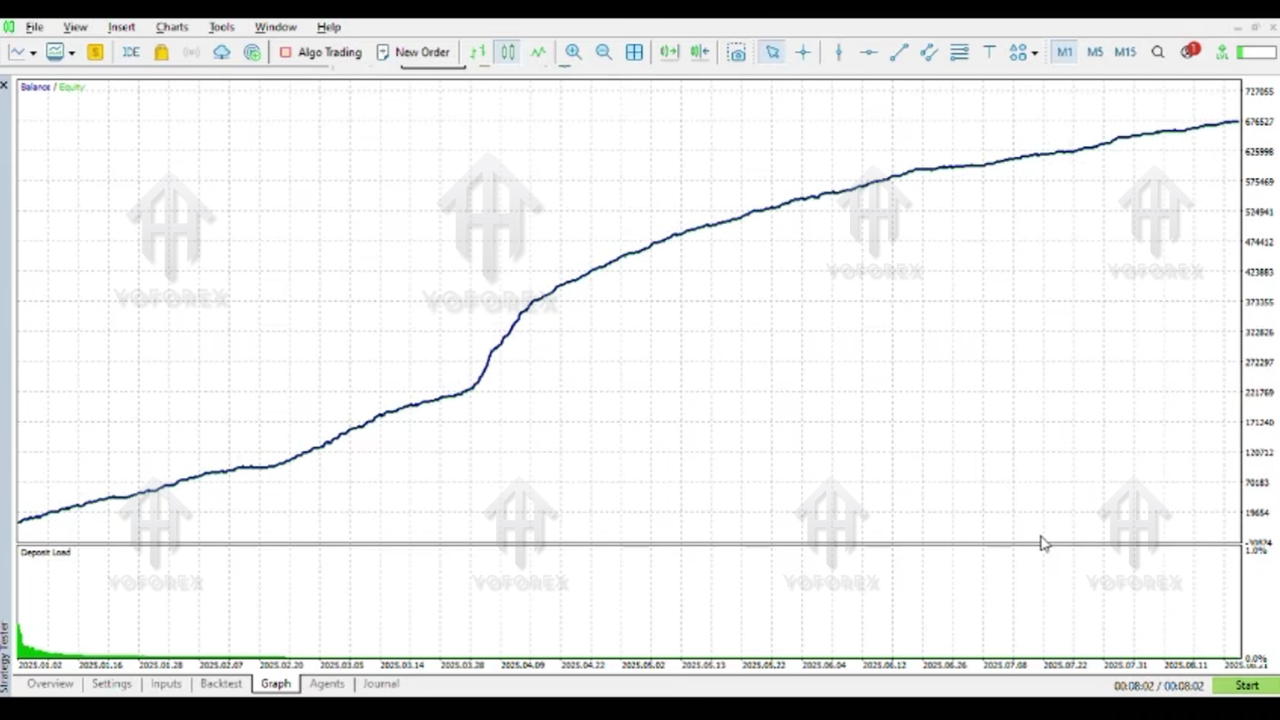
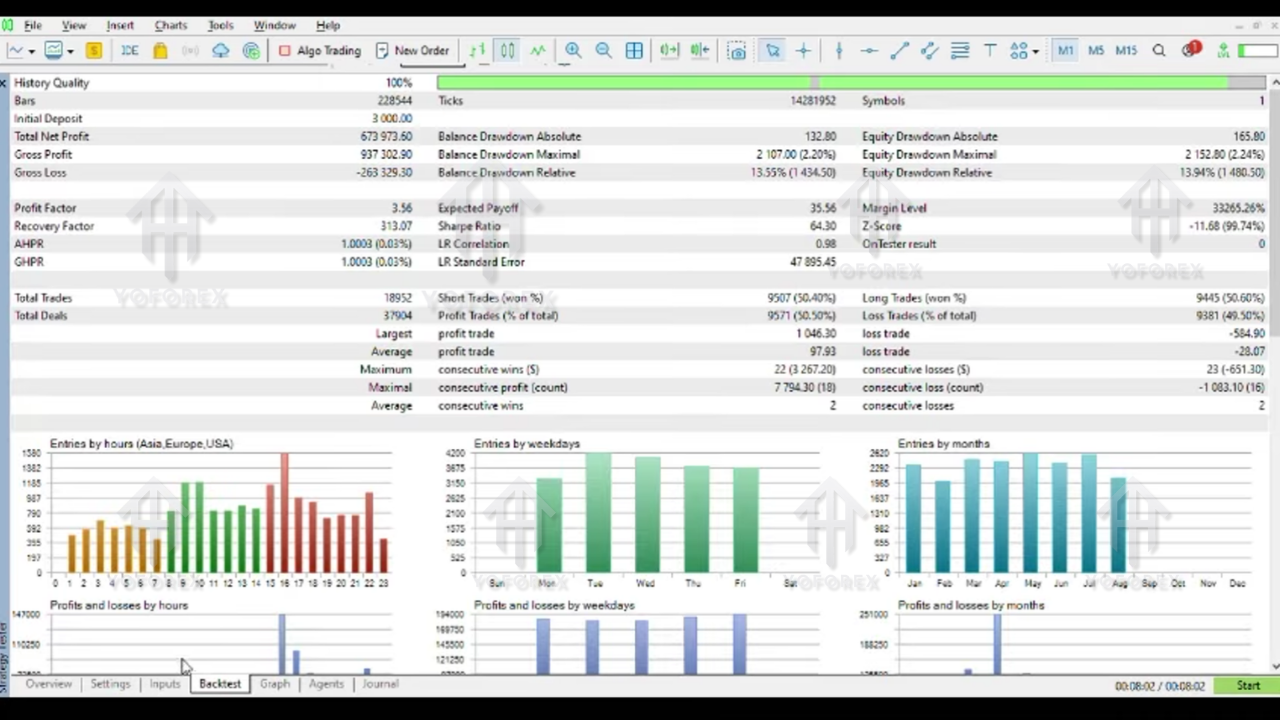
Based on collected backtests from multi-year historical data, the EA shows:
- Accuracy around 68–74% depending on pair and timeframe
- Max drawdown between 10–18% with default risk settings
- Average monthly profit in the range of 8–15%
- Better stability on EURUSD and USDJPY
- Stronger performance on gold during trending market phases
Of course, results will vary based on broker speed, spread, and VPS quality, but overall the EA performs consistently when used with the recommended configuration and proper risk rules.
Installation Guide for 5 Best Expert Advisor EA V1.0 MT5
Here’s the simplest way to install the EA in MetaTrader 5 without messing anything up:
- Download the EA file from your trusted source.
- Open your MetaTrader 5 platform.
- Click on File → Open Data Folder.
- Navigate to MQL5 → Experts.
- Paste the EA file into the Experts folder.
- Close and restart MT5.
- Open a chart (for example, EURUSD M5).
- In the Navigator window, expand Expert Advisors and drag the EA onto the chart.
- Enable:
- Auto Trading
- Allow DLL imports (if required by the EA)
- Apply your preferred settings, click OK and you’re done.
If you’re using a VPS, ensure low latency to your broker server to avoid slippage and missed orders.
Why Traders Prefer 5 Best Expert Advisor EA V1.0 MT5
There are a few solid reasons why this EA is gaining buzz in the automated trading space:
- It’s lightweight and doesn’t overload your MT5 terminal.
- Works well for both day traders and swing traders.
- Handles risk more intelligently using multiple filters.
- Does not rely on dangerous grid or martingale systems.
- Helps new traders avoid emotional entries and revenge trading.
- Saves time—you don’t need to stay glued to the screen all day.
- Can diversify your overall portfolio because of its 5-strategy design.
Overall, it’s built for smooth, rule-based trading whether you’re just starting out or already experienced in the forex market.
Support & Important Disclaimer
If you ever face issues with installation, configuration, or optimization, you should always reach out to support communities or the vendor you got the EA from. Many traders also prefer to join Telegram or WhatsApp groups for live help and shared insights.
Still, even tho the EA is powerful, keep these points in mind:
- Past performance does not guarantee future results.
- Always use proper risk management and avoid over-leveraging.
- Test on a DEMO account before switching to real funds.
- Only trade with money you can afford to risk.
Final Thoughts – Should You Try It?
If you need an EA that’s simple enough for beginners yet strong enough for serious forex automation, the 5 Best Expert Advisor EA V1.0 MT5 is definitely worth testing. Its multi-strategy approach keeps things more stable across different market conditions, and the relatively low drawdown makes it suitable even for smaller accounts when configured correctly.
Try it on a demo account for a few days, watch how it behaves, monitor the risk and trade frequency… and if the style and performance match your expectations, you can slowly integrate it into your live trading plan. Automation is powerful, but only when settings, risk, and discipline work together.






Comments
Leave a Comment