
Hedging Forex EA4 V2.0 MT4 – Harness the Power of Automated Hedging
In forex trading, volatility is both a friend and a foe. While sharp moves in the market can generate profit opportunities, they can also expose traders to sudden losses. Managing this balance is where hedging comes into play. Traditionally, hedging required traders to manually place offsetting trades, but with the evolution of Expert Advisors, this process can now be fully automated.
One standout tool is the Hedging Forex EA4 V2.0 MT4, an automated trading system designed for MetaTrader 4. Its purpose is simple: open buy and sell positions simultaneously, allowing traders to capture gains in either direction while minimizing directional risk. In this article, we’ll explore how it works, its core features, advantages, risks, and best practices for getting the most out of it.
Understanding Hedging Forex EA4 V2.0 MT4
This EA is built around the hedging concept, which means it doesn’t rely on predicting whether the market will go up or down. Instead, it positions both ways and uses small profit targets to lock in gains. Unlike strategies that depend on long-term trends or heavy indicator usage, this EA is designed for short-term consistency.
By combining dual trades, preset take-profit levels, and smart filters, the EA simplifies the hedging process into a hands-free solution for both new and experienced traders.
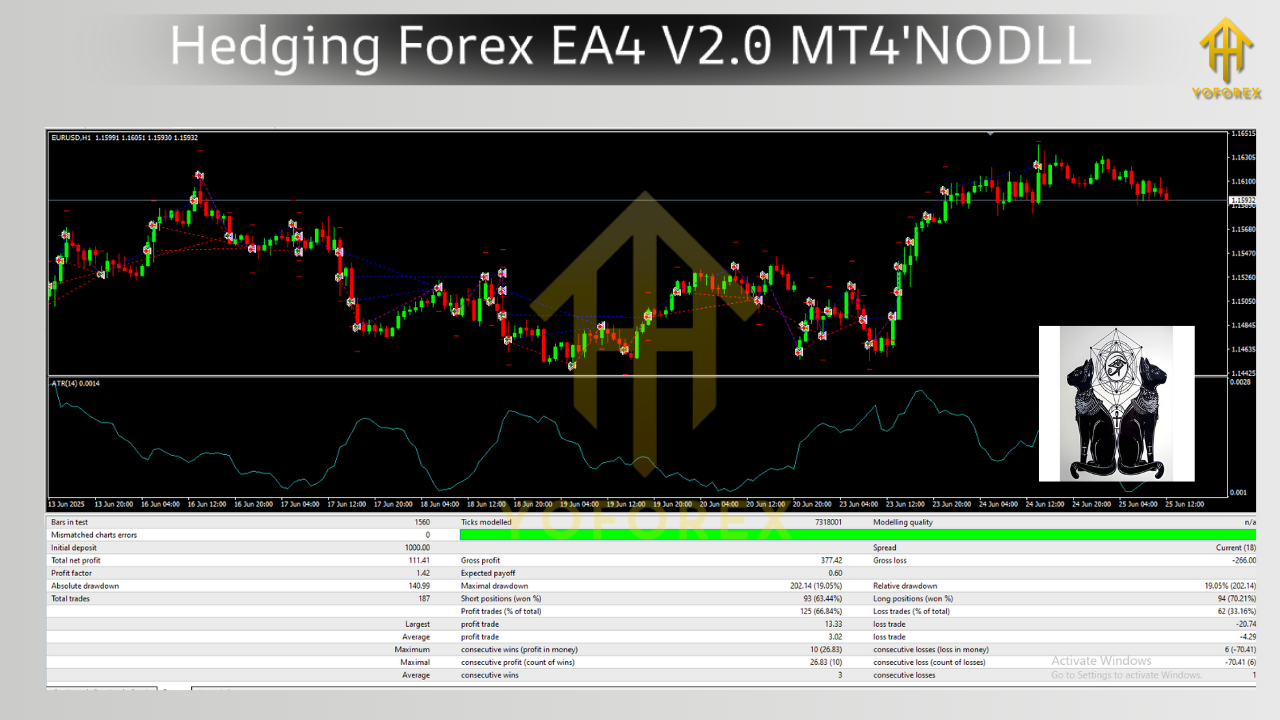
How It Works
The Hedging Forex EA4 V2.0 MT4 follows a sequence of logical steps:
- Simultaneous Trades: Opens one buy and one sell order at the same time.
- Take Profit Goals: Each order is assigned a modest profit target, usually around 20 pips.
- Risk Filtering: Trades are only executed if conditions such as acceptable spreads are met.
- Recovery Logic: In the case of strong one-way movement, the EA may open additional trades to balance equity and reduce drawdown.
The approach is straightforward yet effective, giving traders the opportunity to benefit from any market movement without the need to constantly monitor charts.
Key Features
- Custom Lot Sizing
Traders can either set a fixed lot size or allow the EA to calculate lot sizes based on equity and risk percentage. - Spread Filter
Ensures trades are only placed when spreads are favorable, protecting against slippage in volatile times. - Time-Based Control
The EA allows users to define trading hours to avoid periods of low liquidity or high-impact news releases. - Magic Number Identification
Each trade can be tracked easily using unique identifiers. - Scalping-Friendly Targets
The system is optimized for frequent small gains rather than waiting for big moves.
Why Traders Use This EA
- Works in both rising and falling markets.
- Reduces emotional decision-making by automating trades.
- Generates multiple opportunities each day.
- Simple setup makes it accessible to beginners.
- Adjustable settings make it useful for experienced traders too.
Recommended Settings
- Timeframe: M5 is the most suitable.
- Currency Pairs: EURUSD, GBPUSD, USDJPY, AUDUSD, and other major pairs with tight spreads.
- Minimum Deposit: Around $5,000 for steady performance.
- Leverage: At least 1:400.
- Broker Type: ECN accounts are best.
- Hosting: VPS recommended for uninterrupted execution.
How to Install and Setup
- Copy the EA File
Place the EA in theExpertsfolder inside the MT4 directory. - Restart MT4
After installation, restart the platform to load the EA. - Apply to Chart
Open a 5-minute chart of a major currency pair and drag the EA onto it. - Enable AutoTrading
Allow automatic execution so the EA can place trades. - Configure Inputs
Adjust lot size, risk percentage, maximum spread, and trading hours to your preference. - Test Before Live Use
Run it in a demo account to observe its performance. - Deploy With Care
Begin with conservative settings in live accounts and gradually scale.
Advantages
- Provides protection against unpredictable price swings.
- Generates steady income potential through frequent trades.
- Simplifies hedging, making it beginner-friendly.
- Reduces the need for constant manual monitoring.
- Offers flexibility with adjustable risk and trading times.
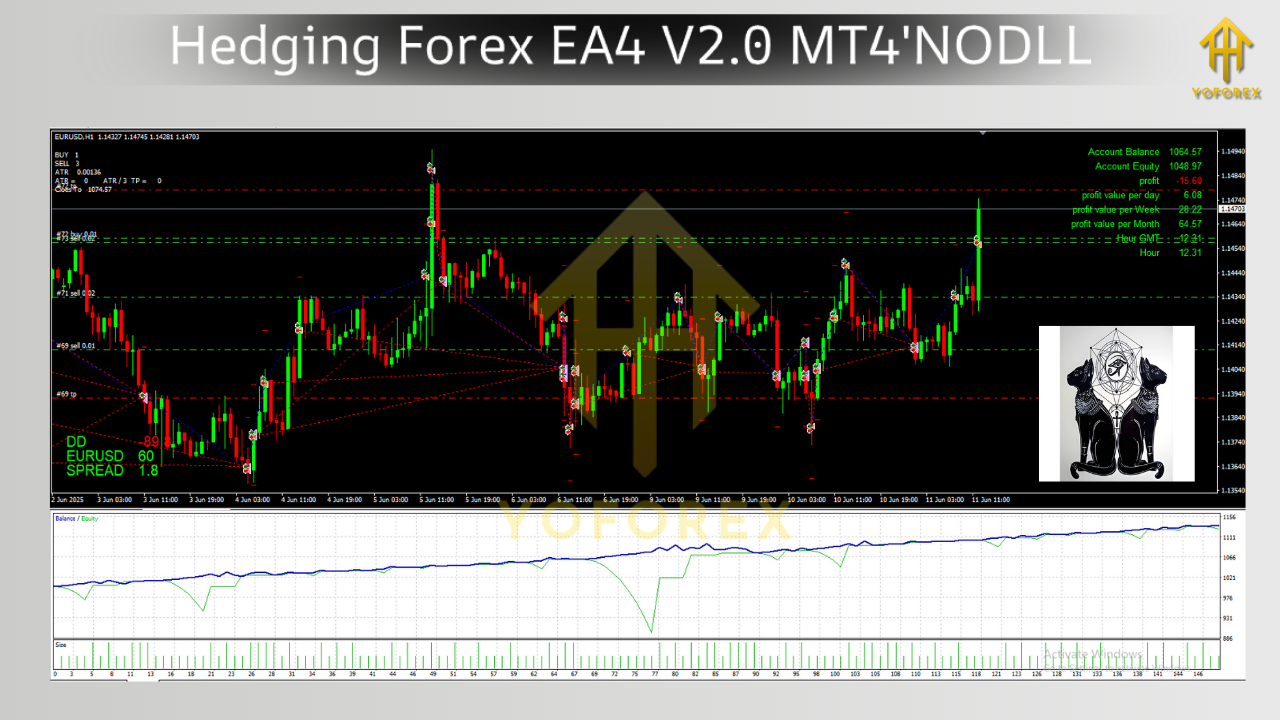
Risks and Limitations
- Requires significant starting capital to handle open trades safely.
- Prolonged one-way trends can cause temporary drawdown.
- Not all brokers allow hedging, so broker selection is important.
- News-driven volatility can affect the effectiveness of hedging.
Understanding these risks is crucial. The EA is a tool to assist trading, not a guarantee of profit.
Best Practices for Success
- Use a Demo First
Always test strategies and settings before going live. - Apply Conservative Risk
Keep exposure to a manageable level, ideally below 2% per trade. - Avoid Trading During Major News
Pause the EA during high-impact economic announcements. - Regular Monitoring
Even with automation, review weekly performance and adjust parameters if needed. - Use VPS Hosting
Ensures uninterrupted operation, which is essential for automated strategies.
Who Should Consider This EA?
- Beginners: Looking for an easy entry into automated trading.
- Busy Professionals: Who cannot dedicate full time to chart-watching.
- Scalpers: Traders aiming for quick, small profits throughout the day.
- Risk Managers: Those who prefer strategies that minimize directional exposure.
Conclusion
The Hedging Forex EA4 V2.0 MT4 combines the principles of hedging with the efficiency of automation. By placing simultaneous buy and sell orders with defined profit targets, it helps traders capture gains in volatile markets while reducing the impact of wrong predictions.
With careful setup, adequate capital, and disciplined risk management, this EA can serve as a valuable companion for traders who want consistent opportunities without being tied to their screens. It’s not a risk-free solution, but for those seeking a structured, market-neutral trading strategy, Hedging Forex EA4 V2.0 MT4 offers a powerful option.






Comments
Leave a Comment