
Cherma EA V1.1 MT4/MT5 – High-Frequency Scalper Built for Today’s Market
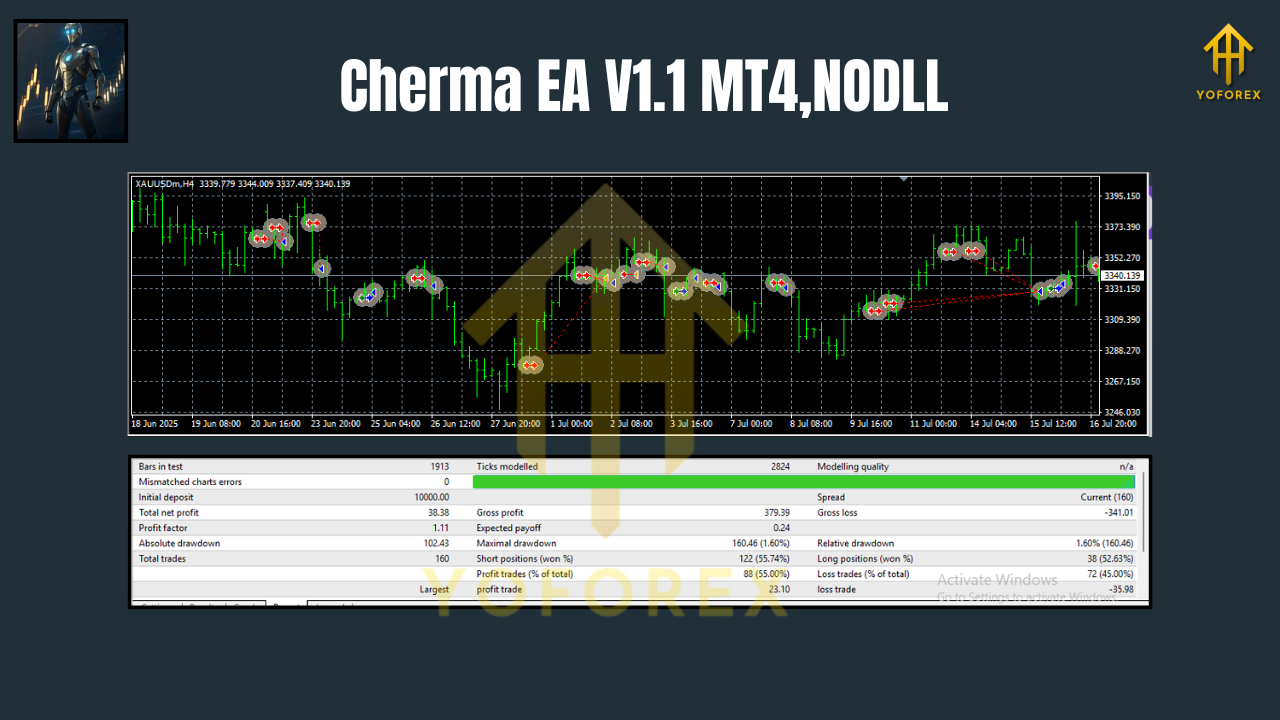
If you’re tired of EAs that promise the moon but trip on live spreads the second New York opens, Cherma EA V1.1 might be the breath of fresh air you’ve been waiting for. Designed for high-frequency scalping, Cherma focuses on XAUUSD (Gold), EURUSD, and GBPUSD, prioritizing efficient entries on M5 and M30 while using H4 as a smart higher-timeframe filter for trend bias. It ships for MT4 and MT5, so you can run it on whichever terminal your broker supports without fiddly conversions or compromises.
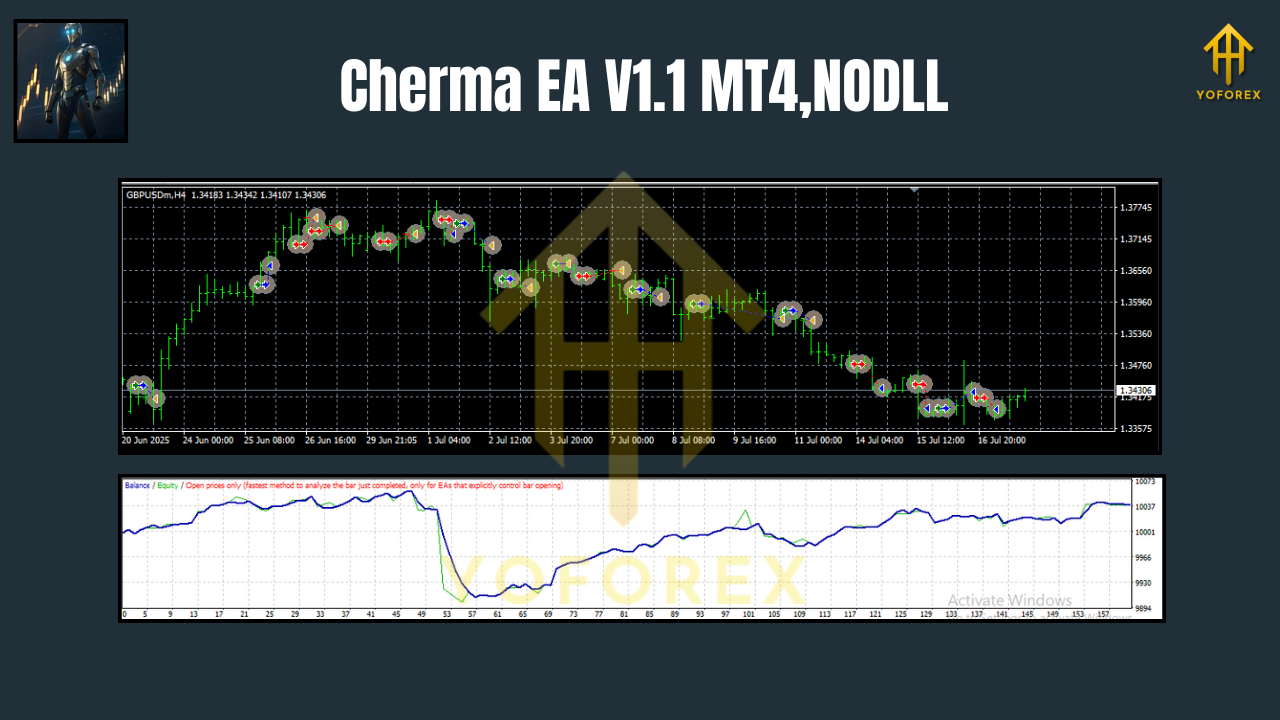
This EA’s goal is simple: capture small, repeatable edges during liquid sessions, exit cleanly, and protect the account during outliers. Instead of chasing martingale fantasies or widening grids, it leans on structured logic—volatility-aware signals, session windows, spread filters, and dynamic risk—to deliver a smoother equity line over time. You keep control with transparent settings; Cherma handles the heavy lifting.
Who Cherma EA V1.1 Is For
- Scalpers who want rapid entries/exits on M5 and M30 with a built-in multi-timeframe context.
- Intraday and swing-aware traders who prefer using H4 as a higher-timeframe trend filter to avoid counter-trend noise.
- Pragmatic users who value risk controls, spread checks, and realistic trade management over “set-and-forget magic.”
What’s New
- Optimized execution flow to reduce missed signals under heavy tick loads.
- Refined session logic (London/NY focus) for tighter filtering during chop.
- Improved spread & slippage guards to avoid poor fills on volatile Gold spikes.
- Cleaner presets per symbol (XAUUSD, EURUSD, GBPUSD) to help you start fast.
Supported Symbols & Timeframes
- Symbols: XAUUSD, EURUSD, GBPUSD
- Working charts: M5 (primary scalping), M30 (lower-frequency entries), H4 (trend filter & context)
Tip: Attach Cherma to M5 for the most activity; use M30 on a second chart if you prefer fewer but more filtered signals. H4 bias can be read internally—you don’t need to open an H4 chart unless you want visual context.
Core Strategy – How Cherma Finds Its Edge
Cherma EA V1.1 blends micro-structure signals with macro context:
- Micro entries (M5/M30): The EA looks for short bursts of momentum and liquidity pockets near intraday levels—ideal for quick scalps.
- Macro context (H4): The higher-timeframe direction acts as a “traffic light,” helping avoid fading strong trends.
- Volatility awareness: ATR-based filters and session timing aim to trade when markets move but spreads remain sane.
- Risk-first execution: Fixed-fractional risk, adaptive SL/TP, and optional break-even logic reduce tail-risk during surprises (news spikes, flash moves).
No martingale. No uncontrolled grids. Just straightforward scalping with tight risk management.
Key Features at a Glance
- High-frequency scalping logic tuned for M5 (with M30 lower-freq option)
- H4 trend filter to keep entries aligned with broader direction
- Per-symbol presets for XAUUSD, EURUSD, GBPUSD
- Spread & slippage controls to avoid bad fills in volatile minutes
- Time/session filters (London and New York focus)
- News-time pause (optional, via manual time blocks)
- Dynamic risk per trade (percentage of balance or fixed lots)
- Adaptive SL/TP with optional break-even and trailing modes
- Equity protections (daily loss cap, max drawdown stop)
- Partial close/scale-out options for smoothing equity
- Magic number/Comment tags for multi-chart management
- Clean logging for auditability and optimization work
Recommended Use by Pair
XAUUSD (Gold):
- Run during London–NY overlap for best liquidity.
- Consider slightly wider SL with modest TP; let trailing handle extensions.
- Keep spread guard strict—Gold can widen suddenly.
EURUSD:
- Great for consistent scalps; spreads usually tight.
- Session windows help avoid Asian chop.
- TP can be slightly smaller; aim for frequency.
GBPUSD:
- Volatile with strong intraday swings—respect risk.
- H4 bias helps you avoid counter-trend fade attempts.
Setup & Installation (MT4/MT5)
- Download & Copy Files:
- Place the .ex4/.ex5 file into MQL4/Experts (MT4) or MQL5/Experts (MT5).
2. Restart Terminal: Close and reopen MT4/MT5, or refresh Navigator.
3. Enable Algo Trading: Make sure AutoTrading/Algo Trading is on.
4. Attach to Chart:
- Open XAUUSD, EURUSD, or GBPUSD on M5 (or M30).
- Drag Cherma EA V1.1 onto the chart.
5. Load Preset (Optional): Use included presets for each pair to start.
6. Broker Settings:
- Use low-spread, low-latency brokers; VPS recommended for consistency.
7. Risk & Filters:
- Set RiskPercent (e.g., 0.5%–1.0% per trade to start).
- Confirm SpreadLimit (in points) and SessionTimes.
8. Test in Demo:
- Forward test for a week to validate execution and refine SL/TP, then go live conservatively.
Optimization & Backtesting Tips
- Data quality: Use high-quality tick data (esp. for Gold).
- Model by session: Optimize separately for London vs NY windows.
- Spread realism: Backtest with variable spread if your tester allows it.
- Robustness checks:
- Shift SL/TP by ±10–20% to see if performance stays stable.
- Nudge spreads/slippage up to “stress” the logic.
- Portfolio thinking: Running Cherma on two pairs with slightly different presets can smooth equity.
Risk Management (Don’t Skip This)
- Start small (0.25%–0.5% per trade) and scale only after stable results.
- Cap daily loss (e.g., 2%–3%) to avoid over-trading after adverse streaks.
- Pause manual trading/news events if your broker’s execution worsens during announcements.
- Always demo first, then go live conservatively.
Frequently Asked Questions
Does Cherma use martingale or grid?
No. Cherma uses fixed-fractional risk with one-shot entries, plus optional trailing/partial close.
Which timeframe is “best”?
M5 for activity; M30 for fewer, cleaner trades; H4 is used as a trend filter, not an entry chart.
What about prop firms?
Risk caps and session filters can help with drawdown rules; still, verify each firm’s rules on EAs and trading windows.
A Simple Starter Preset (Example)
- Chart: XAUUSD M5
- RiskPercent: 0.5
- MaxOpenTrades: 1
- SpreadLimit: broker average + a small buffer
- SessionTimes: London + NY; avoid first minutes of major news
- TP/SL: Start with a 1:1.2 to 1:1.5 R multiple; enable trailing after +0.8R
- BreakEven: On at +0.6R with a small lock-in (e.g., +2 points)
Tweak these as your broker conditions dictate.
Final Thoughts
Cherma EA V1.1 is built for traders who want a no-nonsense scalper that respects risk, trades in liquid windows, and avoids the usual pitfalls of martingale or loose grids. Whether you’re focusing on Gold’s volatility or the tight spreads of EURUSD, Cherma gives you the controls you need—you decide risk, sessions, filters—while the algorithm handles timing and execution.
As always, past performance doesn’t guarantee future results. The point isn’t to “win every trade,” it’s to let a statistically valid edge express itself over many trades, with risk tightly managed along the way.
Quick Specs (At a Glance)
- Platforms: MT4 & MT5
- Pairs: XAUUSD, EURUSD, GBPUSD
- Timeframes: M5 (primary), M30 (alternative), H4 (trend filter)
- Style: High-frequency, risk-aware scalping
- Core Controls: Risk %, Spread guard, Session times, SL/TP, Trailing, Equity protection
Call to Action
Ready to try it? Install Cherma EA V1.1 on a demo account, run it through your preferred session, then take it live slowly with strict risk. The edge is in consistency—and how you manage it.
Join our Telegram for the latest updates and support






Comments
Leave a Comment