CENTRO DE GRAVIDADE (COG) Indicator V1.0 MT4 — A Zero-Lag Oscillator for Sharper Entries
If you’ve ever felt your signals arrive a tad late—price moves, then your indicator nods “yep, it moved”—you’re not alone. That classic lag is exactly what the CENTRO DE GRAVIDADE (COG) aims to reduce. Originally popularized by John Ehlers, a pioneer who brought digital signal processing into trading, the COG for MT4 is designed to be highly responsive, highlighting potential turning points and overbought/oversold zones with less delay than traditional moving averages.
This guide breaks down what the COG is, how it works, and most importantly, how to trade it effectively on EUR/USD, GBP/USD, and USD/JPY across any timeframe on MetaTrader 4 (MT4). We’ll also cover configuration tips, risk management, and a couple of practical strategies you can test right away on demo.
What Is the COG (Center of Gravity) Indicator?
At its core, the COG is an oscillator derived from a weighted average of recent prices, with more weight placed on the latest data. The result is a zero-lag style line that oscillates around a central “gravity” level, often paired with a signal line (a smoothed version of the COG) to help confirm turns.
Why traders like it:
- It reacts quickly to new price information.
- It helps visualize momentum shifts and mean-reversion opportunities.
- Signals tend to feel timelier than with standard moving averages.
Important nuance: On a live bar, any filter that prioritizes new data can “shift” slightly as more ticks arrive. That’s normal behavior and not the same as a repaint of closed bars. Always evaluate signals after candle close if you want the most stable reads.
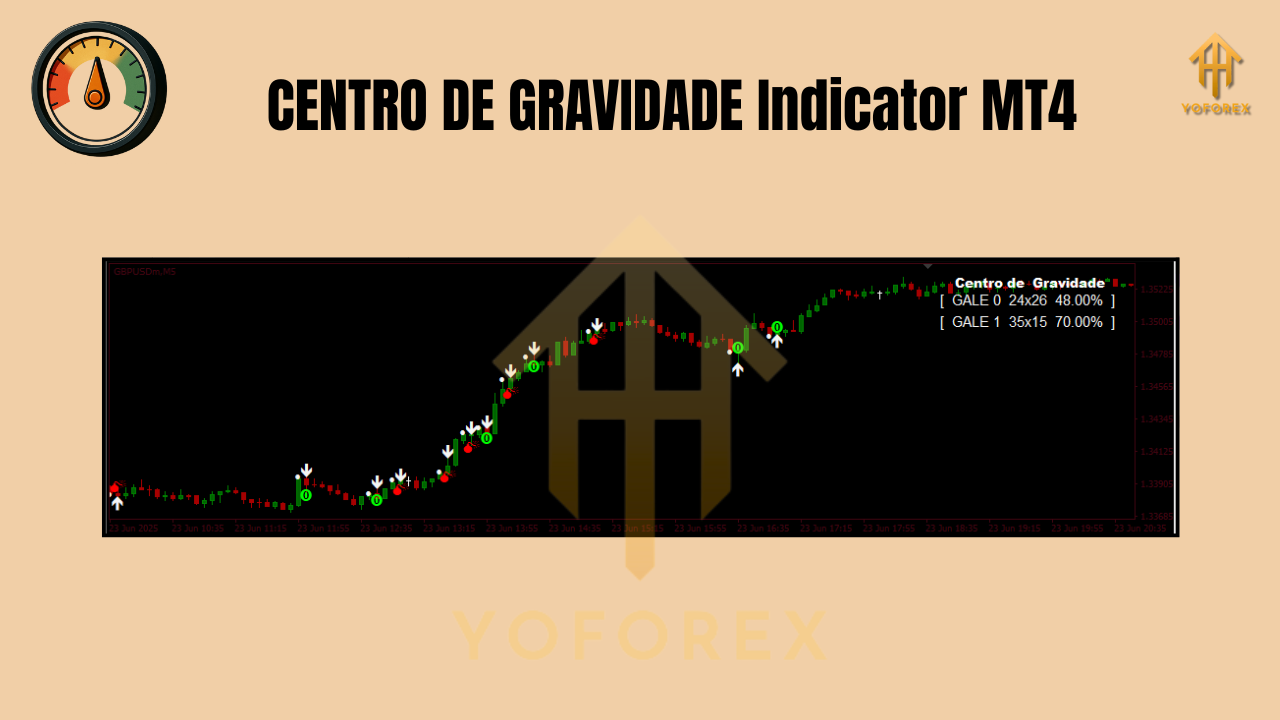
How the COG Works (Plain-English Version)
The COG computes a weighted average of past prices—recent candles carry more influence than older ones. This creates a fast, central line that moves in sync with current price action rather than lagging behind it. Add a signal line (a smoothed version of COG), and you get a visual cue for crossovers and momentum shifts.
Think of it like this:
- Above the center: bullish momentum bias
- Below the center: bearish momentum bias
- COG crossing its signal: potential short-term turns
- Divergence (price vs. COG): potential weakening of the current move
When and Where to Use It
- Pairs: EUR/USD, GBP/USD, USD/JPY
- Timeframes: Any (really).
- M5–M15: Intraday scalps; expect more noise, use filtering.
- H1–H4: Swing trades; clearer structure, fewer false flips.
- D1: Position trades; stronger signals, wider stops.
Tip: Match your trade horizon to your timeframe. Don’t try to capture multi-day swings with an M5 crossover; you’ll get chopped.
Reading the Signals
1) COG vs. Signal Line Cross
- Bullish: COG crosses above signal line (especially if rising through the center/zero zone).
- Bearish: COG crosses below signal line (especially if falling through the center/zero zone).
Filter it with a trend bias (e.g., a 50-period EMA on price):
- Only take longs when price is above the EMA and COG flips up.
- Only take shorts when price is below the EMA and COG flips down.
2) Overbought/Oversold Swings
- Extended COG readings after strong runs can hint at exhaustion.
- Wait for COG to hook back toward the center and confirm via the signal line cross.
3) Divergence
- Bullish divergence: Price makes a lower low, COG makes a higher low → momentum loss on the downside.
- Bearish divergence: Price makes a higher high, COG makes a lower high → momentum fading on the upside.
Always confirm divergence with structure (e.g., a break of a minor swing high/low).
Two Practical Strategies to Try
A) Trend-Follow with Pullback Confirmation (Intraday to Swing)
- Add a 50 EMA to your chart (trend filter).
- Long setup:
- Price above 50 EMA.
- COG dips and then crosses above its signal line.
- Entry on candle close; stop below recent swing low; target 1.5R–2R or trail under higher lows.
3. Short setup:
- Price below 50 EMA.
- COG rises and then crosses below its signal line.
- Entry on candle close; stop above recent swing high; similar targets.
Why it works: You’re aligning COG’s responsiveness with a broader trend bias, cutting down counter-trend noise.
B) Mean-Reversion with Divergence (H1/H4)
- Identify overextended pushes into key zones (prior highs/lows, supply/demand areas).
- Look for COG divergence vs. price.
- Wait for COG/signal re-cross in the direction of the expected snapback.
- Use tight stops (just beyond the extreme) and partial profits at 1.0R, then trail.
Why it works: COG can flag momentum fatigue before price visibly turns, especially on higher timeframes.
Installing & Configuring COG on MT4
- Download/Copy: Place the
COG_Indicator.ex4(or.mq4) file into MT4 → File → Open Data Folder → MQL4 → Indicators. - Restart MT4 or refresh the Navigator pane.
- Attach to Chart: Drag the indicator onto your chosen symbol/timeframe.
- Core Inputs to Explore:
- Period/Length: Sensitivity of the oscillator. Shorter = faster but noisier; longer = smoother but slower.
- Smoothing/Signal Period: Adjust how reactive the signal line is.
- Price Source: Close (default) is fine; experiment with HLC/4 if supported.
- Alerts: If your build includes alerts, enable them after you’ve forward-tested settings.
Starter settings: Begin with a mid-range length (e.g., 14–20) and a modest signal smoothing (e.g., 5–9). Increase smoothing on lower timeframes to tame noise.

Risk & Trade Management (Don’t Skip)
- Position Size: Risk 0.5%–1% per trade when starting out.
- Stops: Place beyond the structural invalidation (not just a random pip count).
- Take-Profit:
- Fixed R-multiples (1.5R–2R) or
- Partial scale-outs (50% at 1.0R, trail the rest).
- Time Filter: If price goes nowhere after a set number of bars, consider scratching the trade.
Even a snappy oscillator can’t fix bad sizing. Protect the downside first.
Strengths & Limitations
Strengths
- Responsive, low-lag momentum read.
- Clear visual for crossovers and divergence.
- Flexible across pairs and timeframes.
Limitations
- Faster settings can whipsaw in choppy markets.
- Works best with a filter (trend, session, or volatility).
- On the live bar, readings can shift slightly as new data arrives—normal for real-time filters.
Best Practices & Tips
- Combine COG with session awareness (London/NY overlap for FX majors).
- Use a HTF confirmation: if you trade M15, glance at H1 COG bias.
- Avoid stacking multiple oscillators that do the same job—keep the chart clean.
- Journal your settings and outcomes; small parameter tweaks can meaningfully change behavior.
Final Thoughts
The CENTRO DE GRAVIDADE indicator shines when you want timely momentum cues without the sluggishness of classic averages. Used with a simple filter and a disciplined plan, it can help you spot clean pullbacks, early reversals, and divergences worth testing. As always, start on demo, log your trades, and let data—not hope—drive your refinements.
Trade safe, and let the math do some of the heavy lifting.
Join our Telegram for the latest updates and support






Comments
Leave a Comment