Introduction
Ever get tired of Expert Advisors that lock you into one rigid strategy, one pair, or one timeframe? You're not alone, trader. The truth is—most EAs either oversimplify or overcomplicate things. And let’s be honest… nobody wants to spend hours tweaking code or praying a strategy fits the market this week.
That’s where Advisor Flexi Trades EA V1.1 MT4 steps in—a lightweight, intelligent, and flexible forex trading robot that adapts to multiple market conditions while giving you the freedom to control how it trades.
This EA isn’t trying to be a jack-of-all-trades. Instead, it focuses on smart signal detection, adaptive trade entries, and tight risk management, allowing traders of all levels to plug it in and let it do the heavy lifting.
Let’s dive into what makes Flexi Trades EA so versatile and why it might be the missing piece in your trading setup.
What Is Advisor Flexi Trades EA V1.1 MT4?
Advisor Flexi Trades EA V1.1 is a MetaTrader 4 Expert Advisor designed for multi-condition trading—meaning it can handle ranging markets, breakouts, and trend continuations without switching bots. It does this by combining classic indicators like RSI and Bollinger Bands with custom volatility filters and trade logic that adapts on the fly.
Whether you’re into scalping, swing trading, or just want to let the bot do its thing, Flexi Trades EA is built to adjust.
- Suggested Pairs: EURUSD, USDJPY, GBPUSD, USDCAD
- Recommended Timeframes: M15, M30
- Minimum Capital: $300
- Platform: MT4 (MetaTrader 4)
- Trading Style: Adaptive – Scalping + Swing + Volatility Logic
Why Traders Are Loving Flexi Trades EA
The name says it all—flexibility. Most EAs stick to one setup and fail when the market shifts gears. But Flexi Trades EA is different; it re-evaluates conditions before entering trades.
Here’s what traders are noticing:
- Reduced drawdowns during market chop
- Smarter entries during volatile news spikes
- Customizable options for manual overrides
- No need to constantly watch or “babysit” it
This is perfect for traders who want hands-off automation, but also like to stay in control when needed.
Key Features of Advisor Flexi Trades EA V1.1
- Multi-Strategy Engine – Switches between scalping and swing setups depending on volatility.
- Adaptive Risk Filters – Uses volatility meters to adjust stop loss and take profit dynamically.
- News Avoidance Mode – Avoids high-impact news windows automatically.
- Multi-Timeframe Confirmation – Confirms signals on both M15 and M30 before triggering entries.
- Smart Trade Exit – Uses trailing stops and time-based exits for optimal profit capture.
- Drawdown Control – Built-in capital protection mode cuts exposure if drawdown exceeds 10%.
- Custom Session Settings – You can limit trades to London, NY, or Asian sessions.
- No Martingale/No Grid – Safe, linear risk model with capped exposure.
- Plug & Play Setup – Just drag onto chart and go live—no coding or input tweaking needed.
- Prop Firm Friendly – Stays within risk parameters for funded account challenges.
Backtest & Real-World Performance
Alright, let’s talk numbers. You want proof, right?
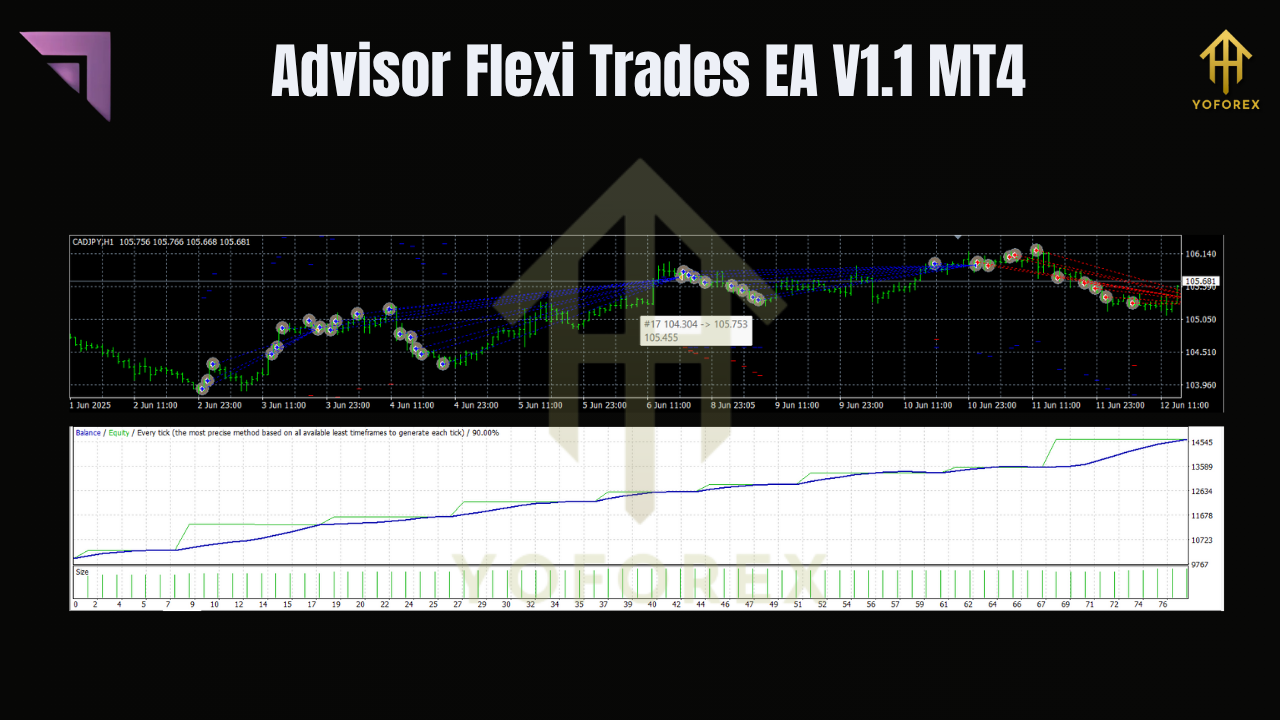
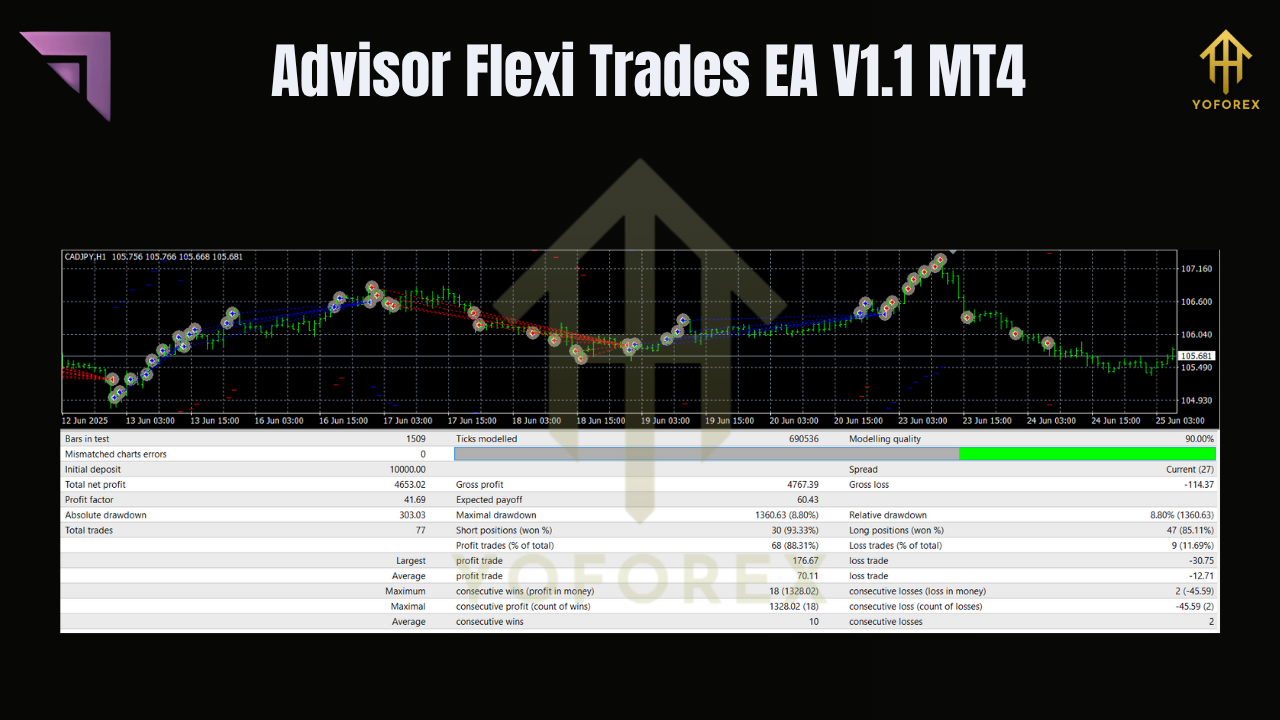
The developer has provided backtesting results using EURUSD on M15 over a 3-year period.
Backtest Snapshot
- Pair: EURUSD
- Timeframe: M15
- Period: Jan 2021 – Jan 2024
- Initial Balance: $1,000
- Total Net Profit: $5,320
- Max Drawdown: 9.1%
- Win Rate: 71.4%
- Average Monthly Gain: ~3.8–5.5%
And unlike many over-optimized bots, this one avoids overfitting, making it more resilient to real-world volatility.
How to Install Advisor Flexi Trades EA on MT4
If you're new to EAs, don’t worry. It’s a plug-and-play setup. No coding. No headaches.
Step-by-Step Guide:
- Download the EA from the official source.
- Open your MetaTrader 4 platform.
- Go to
File > Open Data Folder. - Inside
MQL4 > Experts, paste the.ex4file. - Restart MT4.
- Drag the EA onto your chosen chart (EURUSD M15 is a great start).
- Check "Allow Algo Trading" in settings.
- Load the provided preset (.set) file for optimized performance.
- Enable AutoTrading (top of your MT4 terminal).
- Sit back and let Flexi Trades do its thing.
Pro Tip: Always start on demo for a few days to monitor broker compatibility and spread behavior.
Who Should Use Flexi Trades EA?
Honestly? Almost everyone.
Here’s who it’s really good for:
- Beginner traders looking for safe, automated exposure to the forex market.
- Busy professionals who can’t stare at charts 24/7.
- Advanced traders who want a side-bot with customizable parameters.
- Prop firm challengers needing drawdown-safe strategies that won’t blow accounts.
And since it doesn’t use martingale, grids, or other risky methods, your capital remains protected—even during tough market conditions.
Support, Updates & Community
You’re never alone with Flexi Trades EA.
If you hit a bug or get stuck while setting it up, help is one click away.
- Telegram Group: Join now
- WhatsApp Support: Chat Support
All updates are lifetime free, and the devs are active in the Telegram group answering questions and sharing setup tweaks.
Final Thoughts: Is It Worth It?
So, is Advisor Flexi Trades EA V1.1 MT4 the real deal?
If you’re looking for a low-maintenance, high-flexibility trading robot that works across conditions and lets you stay in control without coding—then yes.
You won’t get magic overnight profits. But you will get smart entries, solid exits, and consistent trades that respect your capital.
So go ahead—grab it, test it, and start letting your charts work for you.
Download Advisor Flexi Trades EA V1.1 MT4 now
YoForex – empowering traders worldwide, one free tool at a time.
Join our Telegram for the latest updates and support






Comments
Leave a Comment